10 n8n Automation Ideas That Businesses Will Actually Pay For
Most "n8n automation ideas" articles tell you what's technically possible. That's the wrong filter. The question isn't "can I automate this?" — it's "does this problem hurt enough that a business will write a check today?" This list applies that filter. Every idea here has a clear buyer, a specific pain point that's already costing money, and a real price range based on what the market pays in 2026. If you're building your freelance service offering or looking for your next client pitch, start here.
How to read this guide
Each idea includes four numbers: price range (what the market pays), build time (realistic hours for a fluent n8n developer), client ROI (when does their investment pay back), and retainer potential (does this become ongoing work). These numbers are what let you walk into a conversation knowing whether a project is worth your time and how to justify your rate.
Ideas are ordered by client demand volume — how often businesses are actively looking to buy this right now. The list ends with the highest-paying ideas, which have lower volume but larger contracts.
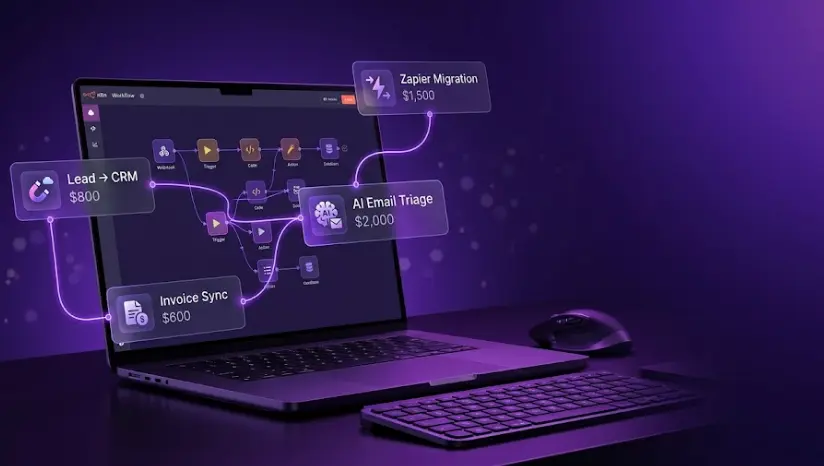
Zapier → n8n Migration
What it is
The client has 10–50 Zapier workflows currently running their business operations. They're paying $400–$1,200/month for Zapier Professional or Team plans. You move everything to self-hosted n8n, eliminating that monthly cost entirely. The project pays for itself in 1–3 months from Zapier savings alone.
Why they buy it NOW
This is the only automation project where the ROI is pre-calculated before you even send a proposal. If a client pays $600/month for Zapier and you charge $1,500 to migrate, they're cash-flow positive in 2.5 months and save $7,200/year afterward. They don't need to be convinced automation is valuable — they already built their business on it. They just want to stop paying Zapier's subscription fees.
What you actually build
Map each Zap to an equivalent n8n workflow. Most Zapier triggers (webhooks, schedule, form submissions) have direct n8n equivalents. Actions (send email, update Sheets, create CRM record) map cleanly. The complexity increases when: the client has multi-step Zaps with conditional logic, custom JavaScript in Zapier Code steps, or integrations without native n8n nodes. Price accordingly — a 20-Zap migration with basic workflows is $1,200; a 15-Zap migration with complex conditional logic and custom code is $2,500+.
The retainer opportunity
After migration, offer a $300–$500/month maintenance retainer. Every business that runs on automation needs someone to fix broken workflows when APIs change, add new automations as the business grows, and monitor for silent failures. Migration clients are the warmest retainer prospects you'll ever have — they've already trusted you with their entire automation stack.
Lead Capture → CRM Enrichment → Team Alert
What it is
A form submission (Typeform, Jotform, website contact form) triggers a webhook. n8n enriches the lead with company data (Clearbit, Hunter.io, LinkedIn), creates or updates the CRM record (HubSpot, Pipedrive, Salesforce), assigns it to the right sales rep based on territory or product type, sends a formatted Slack message to the sales channel, and starts a follow-up email sequence if no rep responds within a defined window. The whole thing runs in under 5 seconds.
Why they buy it NOW
Any B2B company with a contact form is losing leads to slow response times. Studies consistently show that responding to a lead within 5 minutes is 21× more likely to result in qualification than a 30-minute response. When a business is manually checking their email for form submissions and then manually copying data into their CRM, every hour of lag costs real conversion rate. The pain is measurable: if a company closes 5% of leads and each customer is worth $2,000, losing one lead per week to slow response costs $5,200/year.
What you actually build
The basic version (webhook → CRM → Slack) takes 4–6 hours and prices at $600–$800. The full version (multi-source lead aggregation, enrichment API, conditional routing by territory or lead score, timed follow-up sequence, Google Sheets logging for the sales manager) takes 10–14 hours and prices at $1,200–$1,800. Scope it clearly in writing before starting — "lead routing" means different things to different clients.
The retainer opportunity
Businesses add lead sources constantly. A client who starts with Typeform will add LinkedIn Lead Gen Forms, Facebook ads, and a chatbot within 6 months. Each new source is a $200–$400 workflow addition — natural ongoing work that keeps you in the account.
AI Email Triage + Response Drafting
What it is
An n8n workflow polls the inbox (Gmail or Outlook) on a schedule, pulls new emails, sends each through an LLM (GPT-4o or Claude) to classify by type (support request, sales inquiry, billing question, spam, partnership pitch) and urgency. Based on classification, it routes to the appropriate team channel in Slack, creates a ticket in the helpdesk, and drafts a contextually appropriate response in a Google Doc or directly in Gmail drafts. A human reviews and sends. Net result: inbox processing time drops by 60–70%.
Why they buy it NOW
Small support teams at fast-growing companies spend 3–5 hours/day on email triage. At $30/hour for a support person, that's $600–$1,000/week in pure triage labor — before they've answered a single question. When you frame the project as "your team stops spending 3 hours/day on email sorting and starts spending that time actually solving problems," the $1,500–$2,000 price point is immediately obviously worth it. The demo closes this deal: show a live example where 10 emails get classified and drafted in 45 seconds.
What you actually build
The core: Schedule trigger → Gmail/Outlook node → HTTP Request to OpenAI API → Switch node routing by classification → Slack/ticket/draft creation. The complexity is in the prompt engineering — getting reliable classification requires careful system prompt design and a few rounds of testing with real client emails. Add error handling for API failures, rate limiting logic if the inbox receives 200+ emails/day, and a feedback mechanism so the client can flag misclassifications to improve the prompt. See the n8n AI agent tutorial for the LLM integration fundamentals.
The retainer opportunity
AI systems need prompt tuning as the business evolves. New email categories emerge, the tone needs adjusting, a new product line requires new response templates. This is recurring work that clients can't easily do themselves — it requires understanding both the n8n setup and the prompt engineering layer.
Invoice → Accounting Sync (Stripe / Paddle → QuickBooks / Xero)
What it is
Every time Stripe, Paddle, or PayPal processes a payment, n8n fires: creates or matches the customer in QuickBooks/Xero, records the invoice and payment against the right revenue category, reconciles refunds and disputes automatically, and sends a summary to the finance team's Slack channel at end of day. Month-end reconciliation drops from a half-day task to a 15-minute review.
Why they buy it NOW
The buyer here is typically the founder or bookkeeper of a company processing 50–500 transactions/month. They're manually exporting CSV files from Stripe, reformatting them, and importing into QuickBooks — or having their accountant do it at $80–$120/hour. At 4 hours/month at $100/hour, that's $4,800/year in bookkeeping labor for a task that automation handles in 3 seconds per transaction. The contract typically comes from the accountant themselves, who is tired of the manual process and wants to recommend a solution to their client.
What you actually build
Stripe webhook → n8n → QuickBooks API. The core is straightforward; the complexity is in: mapping Stripe product IDs to QuickBooks income categories correctly, handling multi-currency transactions, managing refund and partial-refund events, and testing with the client's real account structure before going live. Never test payment automation in production — set up a Stripe test environment first and get the client to approve the mapping before switching over.
The retainer opportunity
Low, but worth noting: clients add payment processors, change their chart of accounts, or add new product lines. A $200–$300/month retainer for monitoring and updates is reasonable. More often, this project leads to a broader finance automation engagement covering expense tracking and payroll notifications.
Sales Follow-Up Sequence Automation
What it is
When a lead reaches a specific CRM stage (demo booked, proposal sent, quote requested), n8n triggers a timed sequence: Day 1 — personalized follow-up email from the sales rep's account. Day 3 — if no reply, a different angle email with a case study or relevant resource. Day 7 — a task assigned to the rep in CRM to make a personal call. Day 14 — a final "closing the loop" email. If the lead replies at any point, the sequence stops and the rep gets a Slack notification. If the deal closes, the sequence stops and an onboarding workflow begins.
Why they buy it NOW
Most small sales teams follow up once, maybe twice, and then forget. Research consistently shows that 80% of sales require 5+ follow-ups, but 44% of salespeople give up after one. When you show a sales manager that their team is leaving deals in the pipeline with zero follow-up activity, the automation case is immediate. Frame the ROI around their average deal size: if the average contract is $3,000 and closing 2 more deals per quarter from better follow-up is realistic, the $1,000 automation pays back in the first recovered deal.
What you actually build
CRM trigger (HubSpot workflow enrollment, Pipedrive stage change, or n8n polling CRM API) → queue each contact with scheduled delay → Gmail/Outlook send from rep's account via OAuth → check for reply (poll inbox or use threading ID) → conditional branch to continue or stop sequence. The rep personalization layer (inserting name, company, recent interaction context from CRM) is what separates a good implementation from one that feels like spam. A well-built sequence has a 40–60% reply rate on the Day 3 email; a generic one has 8–12%.
The retainer opportunity
Sequences need testing and iteration. Open rates, reply rates, and conversion at each step require analysis and A/B adjustments monthly. This is natural ongoing work — a $350–$500/month retainer for sequence optimization and new sequence creation is easy to justify with performance data.
Build the workflows clients need most
The LearnForge AI Apps course covers n8n, LLM integration, and the workflow architecture skills behind ideas 3, 8, and 10 on this list — the highest-paying automation projects in 2026.
Try a Free LessonReview Monitoring + AI Response Drafting
What it is
n8n polls Google Business Profile, Yelp, Trustpilot, and/or G2 for new reviews on a schedule (every 2–4 hours). When a new review arrives, it posts to a Slack or Teams channel with the reviewer's name, rating, and text. For reviews below 4 stars, it also generates a draft response via GPT-4o — professional, on-brand, and specific to the complaint — and posts it alongside the alert. The manager reviews and publishes with one click. Response time drops from "whenever someone notices" to under 4 hours, which directly impacts local SEO ranking.
Why they buy it NOW
Local businesses live and die by their Google review rating. A restaurant falling from 4.3 to 4.1 stars loses a measurable percentage of walk-in customers. When you frame this as reputation protection — not just "an automation" — the $500–$800 project becomes an obvious investment for any local business spending $500+/month on Google Ads. The trigger for purchase: a business owner who just saw a 2-star review they didn't notice for 3 weeks.
What you actually build
Google Business Profile API doesn't have great webhook support, so this uses n8n's Schedule trigger with polling. Yelp Fusion API for Yelp. For G2 or Trustpilot, check their API documentation — some require web scraping via HTTP Request node. The LLM prompt should include the business name, type, response tone guidelines, and the specific review text. The output is a ready-to-copy response, not a half-finished draft. Test with 20 real recent reviews before delivering.
The retainer opportunity
Low ongoing complexity, but businesses will want to add new platforms (Facebook recommendations, Apple Maps reviews) as they come up. A $200/month retainer is reasonable for monitoring, prompt updates, and new platform additions.
Social Media Content Publishing Pipeline
What it is
The content team writes a post (or approves an AI-drafted one) in a Google Sheet or Airtable with columns for text, image URL, scheduled time, and channels (LinkedIn, Instagram, X, Facebook, TikTok caption). n8n reads the queue on a schedule, pulls each approved row, formats the post for each platform's requirements, and publishes via the respective API or Buffer/Hootsuite API. Status updates back to the Sheet. The content calendar becomes the single source of truth; posting is automatic.
Why they buy it NOW
Content teams at 5–50 person companies typically post to 3–5 channels and spend 45–90 minutes per day on manual cross-posting, resizing images, and reformatting captions. At a content manager's fully-loaded cost of $35/hour, that's $300–$600/week in pure posting labor. The pain accelerates when the team grows from 2 channels to 4 — the manual work roughly doubles while the value per post stays the same.
What you actually build
Airtable/Sheets trigger → format for each platform → platform API or Buffer API. The complication: each social platform has different API rate limits, image dimension requirements, and text length limits. LinkedIn allows 3,000 characters; X allows 280. Instagram requires image dimensions of 1080×1080 minimum. Build platform-specific formatting nodes with validation before publishing. The premium version adds an AI drafting layer — the team writes a brief, the workflow generates platform-optimized versions of each post via LLM, and the team approves before scheduling.
The retainer opportunity
Social platform APIs change frequently. Instagram Graph API, LinkedIn API, and X API all have histories of breaking changes. A $300–$500/month retainer for maintenance, new platform additions, and AI prompt improvements is standard for this type of workflow.
Employee Onboarding Automation
What it is
When a new hire is confirmed in the HRIS (BambooHR, Rippling, Workday) or a Google Sheet tracking new hires, n8n fires a chain of actions: creates the Google Workspace account and configures access groups, provisions Slack workspace and adds to relevant channels, sends an onboarding checklist and welcome email from the hiring manager's account, schedules a 30-minute check-in call for Day 3, assigns IT tasks to the IT team, and sends the new hire a curated resource list for their first week. On Day 30, triggers a satisfaction survey. The hiring manager's involvement: zero, until the Day 3 call.
Why they buy it NOW
Manual onboarding is an operations bottleneck that gets worse as companies scale. At 10 hires/year, a 3-hour manual onboarding process per hire costs 30 hours of HR time — manageable. At 50 hires/year, it's 150 hours, or roughly 4 full-time work weeks. The trigger for purchase is usually a bad onboarding experience: a new hire who waited 3 days for a laptop account, or a manager who forgot to add someone to critical Slack channels. A $1,500 automation eliminates the problem for the lifetime of the company.
What you actually build
HRIS webhook or polling → parallel branches for account creation (Google Workspace Admin SDK), Slack API (invite to workspace, add to channels), email sending (from manager's authenticated Gmail via OAuth), calendar event creation (Google Calendar API), and task creation in project management tool. The Google Workspace and Slack API integrations require OAuth setup and appropriate admin scopes — add 2–3 hours for authentication setup and testing with the client's actual accounts.
The retainer opportunity
Companies update their onboarding process as they grow — new tools get added to the stack, new departments have different requirements, or the welcome sequence gets refined. A $300–$400/month retainer for updates and new role-specific onboarding tracks (engineering vs. sales vs. support) is appropriate for companies hiring 20+ people per year.
Competitor Price + News Monitoring Dashboard
What it is
n8n runs daily: scrapes competitor pricing pages via HTTP Request nodes, extracts price data with a Code node or LLM-assisted parsing, compares to previous values stored in Google Sheets or Airtable, and alerts the team via Slack if prices changed. A second workflow monitors Google News, Reddit, LinkedIn, and the competitors' blog RSS feeds for news about each competitor — product launches, funding rounds, executive changes — summarizes via LLM, and delivers a daily competitive intelligence digest to the team's email or Notion page.
Why they buy it NOW
SaaS companies and e-commerce brands that compete on pricing or features need competitive intelligence but can't justify a dedicated research analyst. When a competitor drops prices by 20% and the sales team finds out 3 weeks later through a lost deal, the cost is immediate and measurable. This automation is sold to product managers, sales leaders, and founders — not developers — so frame the pitch around "knowing what your competitors are doing before your customers tell you about it."
What you actually build
HTTP Request node for scraping (check the site's robots.txt and terms first — scraping terms vary widely). CSS selector or regex extraction for prices. LLM call for news summarization. Google Sheets for historical storage and delta calculation. The complexity is in the data extraction — structured pricing pages are easy; complex SaaS pricing tables with multiple tiers require more sophisticated parsing. Budget 2–3 extra hours for each competitor whose site is non-standard.
The retainer opportunity
High. Competitor pages change structure, new competitors emerge, and the client will want to add new monitoring sources over time. A $300–$500/month retainer for maintenance and expansion is easy to sell because the client gets ongoing intelligence value — it's not just "keeping the lights on."
AI Customer Support Agent with Smart Escalation
What it is
An n8n AI Agent workflow that handles incoming support tickets (email, Intercom, Zendesk, or a chat widget) end-to-end. It classifies the issue, searches the knowledge base for a relevant answer, checks the customer's account status via API, and drafts a complete response. For issues it can resolve with high confidence (password resets, shipping status, basic how-tos, billing FAQ) — it sends the response automatically. For complex or sensitive issues (refunds above a threshold, complaints, technical bugs) — it escalates to a human with a pre-filled draft, the customer's account context, and suggested resolution options. Resolution rate without human involvement: typically 55–70% of tickets.
Why they buy it NOW
A 3-person support team handling 500 tickets/month at $28/hour fully-loaded costs $11,760/month. If 60% of those tickets are automatable (which is typical for most support categories), automating them saves 300 tickets × 8 minutes average handle time = 40 hours/month = $1,120/month in labor. At $2,500 for the automation, payback is 2.2 months — and the savings compound as ticket volume grows. The pitch: "your support team stops spending 60% of their time on copy-paste responses and starts spending it on the problems that actually need a human."
What you actually build
Zendesk/Intercom webhook → n8n AI Agent node → tool calls: knowledge base search (vector search or simple keyword matching), CRM API lookup for customer context, conditional branch for auto-resolve vs. escalate, response generation with few-shot examples in the system prompt, response sending via API or email. The critical design decision: set the confidence threshold for auto-resolution conservatively at first (70%+ confidence = auto-send) and raise it as you validate the system. A support ticket sent incorrectly is far more damaging than a missed automation opportunity.
This is the automation that justifies senior n8n developer rates of $130k+/year or $100–$150/hr freelance. It requires AI agent architecture experience, not just workflow configuration. The n8n AI agent tutorial covers the technical foundation in depth.
The retainer opportunity
Extremely high. AI support agents need ongoing: prompt tuning as new product features are released, knowledge base updates, threshold adjustments as the business scales, and performance reporting. A $700–$1,200/month retainer is appropriate for a production AI support system handling 300+ tickets/month. This is the type of retainer that becomes a long-term client relationship — no business wants to touch their working AI support system without the person who built it.
Quick reference: all 10 ideas ranked by earning potential
Which idea should you build first?
The answer depends on where you are in your freelance journey:
Start with idea 6 (review monitoring) or idea 2 (lead capture → CRM). Low complexity, fast delivery, clear value, and manageable scope. These generate your first reviews on Upwork, which are the real bottleneck at the start. See the n8n freelance guide for the first-client acquisition playbook.
Target idea 1 (Zapier migration) and idea 5 (sales follow-up). Higher budget, clear scope, clients who already understand automation. Each project naturally leads to retainer relationships. Check how to sell automation on Upwork for the connects strategy and proposal structure that wins these.
Ideas 3 (AI email triage) and 10 (AI support agent) are where the real money is in 2026. These require LLM integration experience and AI agent architecture skills. If you're not there yet, the n8n AI agent tutorial is the direct path. The salary guide shows what these skills command in the employment market too.
Build on what you've read
Build the skills behind ideas 3 and 10
AI email triage and AI support agents are the highest-paying workflows on this list — and both require n8n AI agent architecture. The LearnForge AI Apps course covers exactly this: LLM integration, tool calling, escalation logic, and production-ready agent design.
Start Learning for Free