n8n vs Zapier in 2026: Which One Should You Choose?
Zapier built the category and still owns the "connect two apps in five minutes" use case. n8n built something different — a visual programming environment that happens to also connect apps. They overlap just enough to be compared, and diverge just enough that the comparison actually matters depending on what you're trying to build.
Short answer
Best if you want the fastest possible setup, don't want to think about servers, rely on a long tail of niche SaaS apps, and your automations are mostly "when X happens in app A, do Y in app B" — one or two steps.
Best if your workflows have branching logic, loops, error handling, or multiple steps — or if you want to build AI agents with memory and custom tools. Also the clear winner if cost at scale or data control matters to you.
They're not really competing for the same job most of the time. Zapier is an automation appliance — plug it in, it works. n8n is an automation workbench — you build what you need, and the ceiling is much higher once you've climbed the curve. Plenty of people end up using both for different things.
In this comparison
- What n8n and Zapier actually are
- Pricing — executions vs tasks, with real numbers
- App integrations: 7,000+ vs ~400
- Workflow logic: branching, loops, error handling
- Building AI agents — n8n's biggest edge
- Learning curve and day-to-day use
- Self-hosting and data control
- Which one to use — by situation
- FAQ
What n8n and Zapier Actually Are
Zapier shipped in 2011 with a simple promise: connect two web apps without writing code. A "Zap" is a trigger and one or more actions — when a new row appears in a spreadsheet, send a Slack message. That format hasn't changed much in fifteen years, and for a huge number of small businesses, it's still exactly the right amount of complexity. Zapier added Paths (conditional branches) and Filters later, but the core mental model stays linear: this happened, now do that.
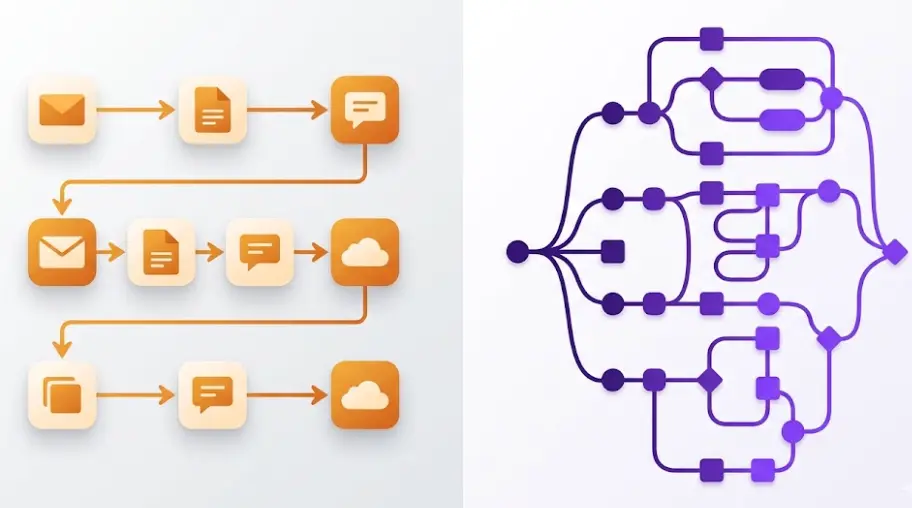
n8n started in 2019 from a different premise — what if automation looked like a flowchart you could actually draw? Workflows are nodes on a canvas connected by lines: a trigger feeds into one or more branches, branches can merge back together, loops can iterate over a list, and any node's output can be transformed with a built-in code node running real JavaScript or Python. n8n is open source under a "fair-code" license, which means you can self-host it on your own server for free, or pay for n8n Cloud if you'd rather not manage infrastructure.
The practical difference shows up the first time you need to do something Zapier's linear model wasn't built for — say, process a list of 50 line items from an order, run a different action depending on each item's category, retry failed API calls up to three times, and then merge everything back into one summary email. In Zapier, that's a tangle of Paths, sub-Zaps, and Looping add-ons that gets fragile fast. In n8n, it's one workflow on one canvas, and you can see the whole thing at a glance.
A note on scope: This comparison is based on real workflows — order processing pipelines, lead-routing automations, AI-powered support bots, and content publishing chains built with both tools. The goal isn't to crown an overall "winner," because the tools were built to solve overlapping but genuinely different problems.
Pricing — Executions vs Tasks, With Real Numbers
This is the part of the comparison that surprises people most, because the two pricing models measure completely different things. Zapier charges per task — every individual action inside a Zap counts separately. n8n charges per execution — one complete workflow run, no matter how many steps it contains.
Take a realistic example: a webhook receives a new order, looks up the customer in a CRM, checks stock via an API, writes a row to a spreadsheet, posts a Slack message to the fulfillment team, creates an invoice, and sends a confirmation email. That's 7 steps. Run it 1,000 times in a month and Zapier counts 7,000 tasks — enough to push you past the 2,000-task Professional plan ($73.50/month) into a higher tier. The exact same workflow in n8n counts as 1,000 executions, which fits comfortably inside the $20/month Cloud Starter plan (2,500 executions/month). Self-hosted, it costs whatever your VPS costs — typically $5-10/month — regardless of how many times it runs.
Entry-level pricing snapshot (2026)
| Plan | Zapier | n8n |
|---|---|---|
| Free tier | 100 tasks/month, 2-step Zaps only | Self-hosted: unlimited, free |
| Entry paid plan | ~$29.99/mo for ~750 tasks | Cloud Starter: $20/mo for 2,500 executions |
| Mid-tier plan | Professional: $73.50/mo for 2,000 tasks | Cloud Grow: ~$50/mo for ~10,000 executions |
| Multi-step workflows | Each step billed separately | Full workflow = 1 execution |
| Self-hosting option | Not available | Yes, free under fair-code license |
The flip side: for genuinely simple automations, Zapier's free plan is hard to beat for zero friction. A 2-step Zap — new email attachment lands in Dropbox — costs the same in both tools at low volume, and Zapier's setup takes about ninety seconds with no account creation beyond signing up. The pricing gap only opens up once workflows grow past two or three steps or volume climbs into the thousands per month, which is exactly the point where most growing businesses end up.
Learn to Build Real Automations With n8n
The LearnForge AI Apps course teaches you to build production workflows and AI agents with n8n from scratch. No prior experience needed. Module 0 is completely free.
Try Free Lesson →App Integrations: 7,000+ vs ~400
On paper this looks like a rout. Zapier lists over 7,000 app integrations; n8n ships with roughly 400 native nodes. If you only look at that number, Zapier wins by a factor of seventeen. In practice, the gap matters far less than it appears — and in some ways it's the wrong number to be looking at at all.
Almost every SaaS product built in the last decade exposes a REST API with documented endpoints and either an API key or OAuth for authentication. n8n's HTTP Request node, paired with its generic credential types, can call any of those APIs directly — set the URL, headers, authentication, and body, and you have a working integration even if n8n has never heard of that app. I've connected n8n to a regional logistics provider's API, a custom internal CRM with no public integrations anywhere, and a fairly obscure print-on-demand service — none of which have a Zapier app, all of which took under twenty minutes to wire up with the HTTP node.
Where Zapier's library genuinely earns its keep is with apps that have unusual or poorly documented APIs, or that require complex multi-step OAuth flows Zapier's team has already solved for you. If you're connecting to, say, a niche real-estate CRM with quirky authentication, having a pre-built Zapier integration saves real time. The honest takeaway: Zapier's app count is a convenience multiplier for non-developers connecting to mainstream tools; n8n's HTTP node is a near-universal adapter for anyone willing to read API docs for fifteen minutes.
One real limitation worth naming: if you're not comfortable reading API documentation and don't want to be, and the app you need isn't one of n8n's ~400 native nodes, you'll feel the gap. n8n's community has built hundreds of additional community nodes, but quality and maintenance vary. For a non-technical user automating mainstream apps (Gmail, Slack, Google Sheets, Shopify, HubSpot), both tools have solid native support and this entire section is mostly moot.
Workflow Logic: Branching, Loops, and Error Handling
This is where the two tools diverge the most, and where the choice stops being about preference and starts being about whether your automation is even possible in one tool without workarounds.
Zapier: Paths work, but each branch is its own mini-Zap
Zapier's Paths feature lets a Zap split into up to ten conditional branches based on field values — "if order total > $500, do A; otherwise do B." This covers a lot of real automations. The limitation appears when branches need to converge again later, or when you need branching logic nested inside other branching logic. Zapier doesn't really support re-merging paths back into a single flow; once you've split, each path runs to its own end.
n8n's IF and Switch nodes do the same conditional splitting, but branches can merge back together using a Merge node — so you can split logic, do different things on each branch, and then continue with a single unified flow. For workflows where "different things happen depending on X, but then everything continues the same way," n8n's model maps more directly to how you'd actually draw it on a whiteboard.
n8n wins on branch/merge flexibilityn8n: native loop nodes vs Zapier's Looping add-on
Need to process every line item in an order, every row in a CSV, or every contact returned by an API? n8n's Split In Batches node iterates over arrays natively, processing each item (or batch of items) through the rest of the workflow before continuing. It's a first-class part of the canvas.
Zapier added looping later via "Sub-Zaps" and the Looping by Zapier app — functional, but it runs as a separate Zap that gets triggered for each item, which means each loop iteration consumes its own task count and adds latency from the extra Zap-to-Zap handoff. For workflows that process lists of more than a handful of items, this adds up quickly both in cost and in complexity to debug.
n8n wins — loops are native, not bolted onBoth have it, n8n's is more granular
Zapier lets you configure a Zap to retry failed steps automatically and send notifications on failure — straightforward and sufficient for most simple automations. n8n offers per-node error handling: you can attach an "error workflow" that runs whenever any node fails, configure retry counts and wait times per node, and route failed items down a separate error-handling branch rather than failing the whole run. For a workflow processing hundreds of API calls where a handful might fail due to rate limits, n8n lets you catch and retry just those, while Zapier's options are coarser.
Both adequate · n8n more granular for complex flowsBuilding AI Agents — n8n's Biggest Edge
If there's one area where the gap between these tools is largest, it's here. n8n's AI Agent node is built on the LangChain framework and gives you what is essentially a visual agent-development environment: pick any LLM provider (OpenAI, Anthropic, Google Gemini, or self-hosted models through Ollama), attach a memory type (simple buffer, sliding window, or vector-store-backed long-term memory), and connect tools the agent can call — other n8n workflows, HTTP requests to external APIs, vector database lookups, calculators, web search.
The result is a real ReAct-style agent: it receives a request, reasons about which tool to use, calls it, observes the result, and decides whether to call another tool or respond. I've built a support-ticket triage agent this way — it reads an incoming ticket, searches a vector store of past resolutions for similar issues, checks an order-status API if the ticket mentions an order number, and drafts a reply, all as one agent making its own decisions about which steps to take. That's not a hypothetical — it's a workflow pattern that comes up constantly once you start building with n8n's AI nodes.
Zapier's AI features — Zapier Agents and the AI-powered steps available inside regular Zaps (summarize, extract data, draft a response) — are genuinely useful for lighter tasks. Ask a Zap to read an incoming email and extract the sender's intent as structured data, then route based on that, and it works well. What Zapier doesn't offer is the same depth of customization: you can't easily attach a custom tool you've built, wire in your own vector database, or give the AI step persistent memory across runs the way n8n's memory nodes do. Zapier's AI is a feature inside an automation; n8n's AI Agent node is closer to a framework for building an agent.
Why this matters beyond the tech: "AI agent" is one of the fastest-growing categories of automation request from businesses in 2026 — chatbots that can actually take action, not just answer questions. If that's a direction you're heading, the tool you pick now shapes how far you can take it later without a rebuild.
Learning Curve and Day-to-Day Use
There's no honest way to write this section that ends with "they're equally easy to learn." Zapier's interface — pick a trigger app, pick an action app, map some fields, turn it on — is about as close to zero learning curve as automation software gets. Someone who has never built an automation before can have a working Zap running inside their first session, often inside their first ten minutes.
n8n's canvas asks more of you up front. You need to understand that data flows between nodes as JSON, that you reference earlier node outputs with expressions like {{ $json.email }}, and that the order nodes appear on the canvas matters for how data moves through them. None of this is hard, exactly, but it's not nothing either — realistically, budget a few focused hours, not minutes, before you're building workflows independently rather than following a tutorial.
The thing that doesn't show up in "which is easier to learn" comparisons is what happens after the learning curve. Once you understand n8n's canvas, building a complex workflow with five branches and a loop takes about the same effort as building a simple two-step one — you're just placing more nodes and drawing more lines. In Zapier, complexity compounds: a workflow that would be one n8n canvas often becomes three or four separate Zaps linked by webhooks, each with its own task budget, each a separate thing to maintain and debug when something breaks at 2am.
Self-Hosting and Data Control
Zapier is cloud-only. Every piece of data that passes through a Zap — customer emails, order details, support tickets, API keys — flows through Zapier's infrastructure. For most businesses this is a non-issue; Zapier has solid security practices and SOC 2 compliance. But for businesses in regulated industries, or anyone with a contractual or legal requirement that certain data never leaves their own infrastructure, "cloud-only" is a hard stop, not a preference.
n8n can run entirely on infrastructure you control — a Docker container on a $5/month VPS, an internal company server, or a Kubernetes cluster, depending on scale. Data never has to leave your network if you don't want it to. This isn't just a compliance checkbox; it changes what you're comfortable automating. A workflow that pulls customer PII from a database, transforms it, and writes it to another internal system is something many teams won't run through a third-party cloud service regardless of that service's security posture — but will run on their own server without a second thought.
The trade-off is maintenance. Self-hosted n8n is your responsibility — updates, backups, uptime, scaling if execution volume grows. n8n Cloud exists precisely for people who want the self-hosted tool's flexibility without managing a server, at a price between "free but you maintain it" and Zapier's fully-managed model. For a small team, a basic VPS running n8n in Docker with automated backups is genuinely low-maintenance — closer to "set it up once and check on it monthly" than "a part-time sysadmin job."
Which One to Use — By Situation
You need a simple 1-2 step automation, today, with zero setup
Zapier. New form submission → add row to spreadsheet → send Slack notification. This is Zapier's home turf, and at this level of complexity n8n offers no real advantage that justifies the extra setup time. Pick Zapier, connect the two apps, done.
Your workflow has branches, loops, or more than 4-5 steps
n8n. Once a workflow has conditional logic that needs to recombine, or processes a list of items, or chains together more than a handful of steps, n8n's canvas keeps it as one maintainable thing. The equivalent in Zapier tends to fragment into multiple linked Zaps that are harder to understand at a glance and more expensive to run.
You're building an AI agent that needs to take actions and remember context
n8n, clearly. The AI Agent node with custom tools and memory is built for exactly this, and there isn't a close equivalent on Zapier's side. If "AI agent" is more than a buzzword in your plans — if you actually need an LLM that can call tools, check its own previous outputs, and decide what to do next — n8n is the platform built for that job.
You rely on a very niche SaaS app with a dedicated Zapier integration
Zapier — or check if n8n's community nodes cover it first. If a tool you depend on has a polished, well-maintained Zapier app but no documented public API (or a painful one), Zapier's pre-built integration can save real time. This is genuinely rarer than it used to be, but it does happen.
Your automations touch sensitive data and can't leave your infrastructure
n8n, self-hosted. This isn't close — Zapier simply doesn't offer a self-hosted option, so if data residency or "never touches third-party servers" is a hard requirement, n8n is the only one of the two that can satisfy it.
You're running thousands of multi-step automations per month and cost matters
n8n. The per-execution vs per-task pricing gap compounds directly with workflow complexity and volume. At meaningful scale with multi-step workflows, n8n Cloud or self-hosted n8n costs a fraction of the equivalent Zapier plan — often the difference between $20-50/month and $150-300+/month for the same automation load.
Frequently Asked Questions
Is n8n cheaper than Zapier?
For simple 1-2 step automations at low volume, the two are close — Zapier's free plan (100 tasks/month) and n8n's free self-hosted option are both viable starting points. Once workflows get more complex, n8n pulls ahead. Zapier bills per action, so a 7-step workflow run 1,000 times burns 7,000 tasks, pushing you onto a $73.50/month Professional plan or higher. The same workflow in n8n counts as 1,000 executions — comfortably inside a $20/month Cloud Starter plan, or free if self-hosted on a $5-10/month VPS.
Can n8n do everything Zapier can do?
For the vast majority of practical use cases, yes — and often more. Zapier has a larger library of pre-built integrations (around 7,000+ vs n8n's roughly 400 native nodes), which matters for niche apps without a documented API. But almost every modern SaaS product has a REST API, and n8n's HTTP Request node can connect to essentially any of them. What n8n adds — branching that re-merges, native loops, code nodes for custom logic — covers scenarios Zapier's linear structure can't express without splitting into multiple Zaps.
Is n8n harder to learn than Zapier?
Yes, but the curve is shallower than expected. Zapier's trigger-then-action format is the simplest possible model — a working Zap in under five minutes with zero technical background. n8n's canvas takes a few focused hours rather than minutes to get comfortable with. The payoff is that once you understand it, n8n can build workflows that would require three or four separate Zaps chained together in Zapier — for someone willing to spend a weekend learning it, the ceiling is much higher.
Which is better for building AI agents, n8n or Zapier?
n8n, by a meaningful margin. Its AI Agent node is built on LangChain and lets you plug in any LLM provider, attach custom tools, and choose memory types — a real agent-building environment. Zapier's AI Agents and AI-powered actions are useful for lighter tasks like drafting text or simple classification, but are more templated and harder to extend with custom tools or persistent memory. For an actual AI agent with tool access and memory, n8n is the more capable platform.
Related Articles
n8n Pricing 2026: Free vs Cloud vs Self-Hosted — What You Actually Pay
Full n8n pricing breakdown with real execution math and honest cost comparison to Zapier and Make at different usage volumes.
How to Build AI Agents with n8n — Step by Step (No Code)
Build real AI agents with n8n's AI Agent node: memory types, connecting live tools, debugging ReAct, and a full production support agent example.
n8n Review 2026: Is It Really the Best Automation Tool?
Honest review based on real production use: AI Agents, self-hosting value, real limitations, and who n8n is the right fit for.
Build AI Apps From Scratch — Learn the Full Stack
The LearnForge AI Apps course covers n8n, FlutterFlow, and AI API integration — from zero to shipping real projects. No prior AI experience required. Module 0 is completely free.
Start Free Lesson →