n8n Pricing 2026: Free vs Cloud vs Self-Hosted — What You Actually Pay
n8n's pricing page lists a $20/month starting price. That number is accurate but incomplete. The real cost depends on whether you self-host, which plan tier you need, and — critically — how n8n counts usage differently from every other tool in the same category. Most people comparing prices get the math wrong.
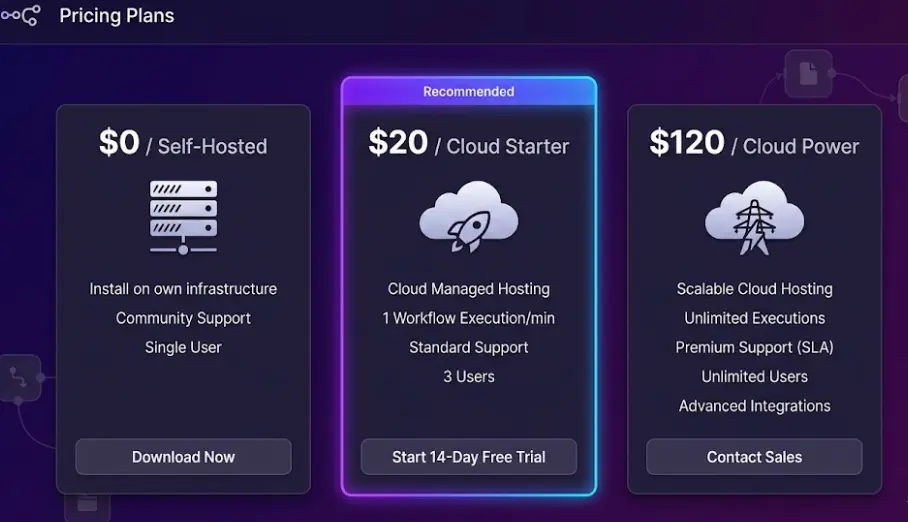
Pricing at a glance
The key difference from Zapier: n8n charges per complete workflow run, not per individual action step. A 15-step workflow that runs 1,000 times costs 1,000 executions in n8n but 15,000 tasks in Zapier. At anything beyond minimal volume, this pricing model changes the cost comparison completely.
In this article
Self-Hosted: What "Free" Actually Means
n8n self-hosted is free in the way that a piece of land is free — you own it, there are no ongoing fees, but you're responsible for everything that happens on it. The software license costs nothing. The server it runs on does.
A basic VPS sufficient for running n8n — 1–2 vCPUs, 2GB RAM, 20GB storage — runs $5–$10/month from providers like Hetzner, DigitalOcean, Vultr, or Linode. That's the baseline. n8n recommends at least 2GB RAM for reliable operation when running multiple concurrent workflows; 4GB is more comfortable if you're running AI Agent workflows that hold models in memory. A 4GB VPS runs $12–$18/month depending on the provider.
The self-hosted instance includes every feature n8n has — AI Agent nodes, vector store integrations, the Code node for JavaScript and Python, version history, team credentials, project folders — without any feature tier restrictions. There's no "some features require a paid plan" on self-hosted. You get the full product.
The Sustainable Use License restriction: n8n's self-hosted version uses the Sustainable Use License, not a standard open-source license. The critical clause: you cannot use a self-hosted n8n instance as a component of a commercial product or service sold to your own customers. If you're building a SaaS platform where n8n processes your customers' data as part of the product you're charging them for — that requires a commercial license agreement with n8n. For internal business automation (your company using n8n to automate its own processes, workflows, and tools), the Sustainable Use License places no restrictions and costs nothing.
The non-monetary cost that comparisons consistently understate is maintenance time. n8n releases new versions every 2–4 weeks. Major releases occasionally include breaking changes that require updating workflow expressions or reconfiguring credentials. For a developer comfortable with Docker and Linux, a routine update takes 10–20 minutes. For someone without that background, each update is a small project. Teams that aren't technically comfortable with server management should factor 1–3 hours per month of maintenance work into their "free" cost estimate — or choose n8n Cloud instead.
Real self-hosted cost breakdown (monthly)
One practical note on self-hosted reliability: n8n doesn't include a built-in monitoring or alerting system. If your server goes down at 3am and a workflow that processes overnight orders fails silently, you find out when someone asks why their order didn't get processed. Setting up uptime monitoring (something like UptimeRobot, which has a free tier) and configuring n8n's global error workflows to send Slack or email alerts adds meaningful reliability — and takes about an hour to set up. It's not optional for production use.
Cloud Plans — Full Breakdown for 2026
n8n Cloud handles all infrastructure, updates, SSL, and uptime — you pay for the service and focus on building workflows. There are four tiers in 2026, with the jump from Starter to Grow being the most significant in terms of what it unlocks.
Self-Hosted
- Unlimited workflows
- Unlimited executions
- All features included
- Full data privacy
- You manage updates & uptime
- Internal use only (SUL)
Cloud Starter
- 2,500 workflow runs/mo
- 5 active workflows
- Managed by n8n
- Community support
- All core features
- No server management
Cloud Grow
- 10,000 workflow runs/mo
- Unlimited active workflows
- Version history
- Email support
- Team members
- All Starter features
Cloud Power
- 50,000 workflow runs/mo
- Custom variables
- External secrets vault
- Advanced permissions (RBAC)
- Priority support
- All Grow features
The Starter plan's 5-active-workflow limit is the constraint that catches people by surprise. Active means currently enabled and running — you can have more workflows saved but only 5 running simultaneously. For a solo user or very small team with a handful of automations, this is fine. For anyone building a real automation stack — a lead routing workflow, a CRM sync, a weekly report, a customer notification sequence, an AI agent — 5 slots fill up quickly. The jump to Grow at $50/month removes that limit entirely.
Annual billing reduces both Cloud Grow and Cloud Power by approximately 17% (the equivalent of getting two months free). At $50/month for Grow billed monthly versus roughly $42/month billed annually, the annual option is $96 cheaper per year — meaningful but not enough to lock in if you're still evaluating usage.
Enterprise pricing: n8n Enterprise is custom-quoted, typically starting around $500–800/month depending on team size and requirements. It adds SSO (SAML, LDAP), advanced audit logs, SLA guarantees, dedicated support, and the ability to use n8n for building customer-facing products (the commercial license). Most teams don't need Enterprise — it's relevant for large organizations with compliance requirements or SaaS companies that want to embed n8n functionality in their product.
Build AI Apps & Automations With n8n
Our AI Apps course covers n8n workflows, FlutterFlow, and AI API integration. Learn to build real production automations — from zero to shipping. Module 0 is completely free.
Try Free Lesson →The Execution Math: How to Estimate Your Real Usage
The single most important thing to understand about n8n's pricing is what counts as one execution: one complete run of a workflow from start to finish, regardless of how many nodes it contains. A workflow with 2 nodes and a workflow with 40 nodes both cost one execution each time they run.
This matters enormously when comparing with Zapier, which charges per action — each step in each workflow is a separate task. A 10-step n8n workflow that runs 500 times a month costs 500 executions. The equivalent Zapier setup costs 5,000 tasks. That's a 10x difference in metered usage — and a dramatic difference in monthly cost once you leave free tiers behind.
To estimate your n8n execution count, you need two numbers: how many times each workflow runs per month, and how many workflows you have active. A workflow triggered by a webhook fires once per incoming request. A scheduled workflow fires based on its cron schedule — a workflow running every hour fires 720 times a month. A workflow triggered manually fires only when you run it.
Usage estimation by business type
| Scenario | Typical monthly executions | Fits plan |
|---|---|---|
| Personal use: 3–4 workflows, mostly scheduled | 200–600 | Starter ($20) |
| Small business: CRM sync, lead notifications, weekly reports | 1,000–2,500 | Starter ($20) |
| Growing startup: e-commerce automation, support triage, data pipelines | 3,000–9,000 | Grow ($50) |
| Active SaaS or agency: hourly monitoring, customer workflows, AI agents | 10,000–50,000 | Power ($120) or self-host |
| High-volume operation: real-time event processing, 100k+ events/mo | 50,000+ | Self-hosted or Enterprise |
The hourly-scheduled workflow is a common source of overestimation surprises. If you build a workflow that polls an external API every hour to check for new records, it runs 720 times a month. If you have five such workflows — monitoring different things, checking different sources — that's 3,600 executions from five workflows alone, putting a Starter plan user solidly into Grow territory. Polling workflows are often better designed as webhook-triggered workflows (where the source system pushes data to n8n rather than n8n pulling), but that requires the source system to support webhooks.
Overage behavior: n8n Cloud does not automatically charge overage fees if you exceed your monthly execution limit. When you hit your cap, workflows stop executing until the next billing cycle resets the counter — or until you upgrade your plan. This is safer than surprise overage charges but can cause silent automation failures if you're not monitoring your usage. n8n Cloud shows current execution count in the dashboard; set a calendar reminder to check it mid-month if you're consistently near your limit.
Why n8n's Pricing Model Beats Zapier at Scale
The per-action pricing model that Zapier uses made sense when automations were simple two-step Zaps: trigger, one action, done. Costs were predictable because each Zap did one thing. As automation has evolved — multi-step workflows, conditional branches, loops, sub-workflows, AI processing chains — the per-action model has become progressively more punishing.
Consider a realistic order processing workflow: a webhook receives an order, validates the customer, updates a Google Sheet, checks inventory via an API call, sends a Slack notification to the warehouse team, creates a Stripe invoice, and sends a confirmation email. That's 7 actions per order. At 1,000 orders per month, Zapier charges 7,000 tasks. n8n charges 1,000 executions. On Zapier's Professional plan ($73.50/month for 2,000 tasks), you'd need to upgrade to a higher tier — the equivalent workflow volume costs $150–200/month. On n8n Cloud Starter, 1,000 executions is well within the 2,500 limit.
Make (formerly Integromat) also uses a per-operation model, where each module execution in a scenario is a separate operation. For a 7-module scenario running 1,000 times: 7,000 operations. Make's Core plan at $9/month includes 10,000 operations, which covers this volume — but Make's pricing is genuinely competitive for lower volumes, and its cost advantage over n8n Cloud shrinks as workflows grow more complex. At 50,000 operations per month, Make's Teams plan ($29/month) and n8n Grow ($50/month) serve different audiences more than they compete directly.
What the pricing models mean in practice for a 7-step workflow running 1,000×/month
| Tool | Metered units used | Monthly cost | Plan required |
|---|---|---|---|
| n8n Cloud | 1,000 executions | $20 | Starter |
| Zapier | 7,000 tasks | $73.50 | Professional |
| Make | 7,000 operations | $16 | Pro |
| n8n self-hosted | Unlimited | ~$10 | VPS only |
Note: Make's pricing is competitive for lower volumes but doesn't include n8n's native AI Agent infrastructure or self-hosting option.
The math flips when workflows are very short. A simple 2-step workflow — webhook trigger, send a Slack message — costs the same in n8n (1 execution) as it does comparatively in Zapier (2 tasks per run). At that level of simplicity, Zapier's larger app library and lower barrier to entry for non-technical users makes it the practical winner. n8n's per-run pricing advantage compounds as workflow complexity grows.
n8n vs Zapier vs Make — Price Comparison at Real Volumes
The table below shows monthly cost at different volumes assuming an average of 6 actions per workflow run — a reasonable estimate for automations beyond basic two-step connections.
| Monthly volume (complete workflow runs) |
n8n Cloud | n8n Self-Hosted | Zapier | Make |
|---|---|---|---|---|
| 500 runs | $20 (Starter) | ~$10 | $20 (Starter) | $9 (Core) |
| 2,000 runs | $20 (Starter) | ~$10 | $73.50 (Professional) | $16 (Pro) |
| 5,000 runs | $50 (Grow) | ~$10 | $150+ (Team) | $29 (Teams) |
| 10,000 runs | $50 (Grow) | ~$10–15 | $300+ | $29–59 |
| 50,000 runs | $120 (Power) | ~$15–20 | $1,000+ | $59–99 |
Two things stand out in this comparison. First, Make is genuinely competitive with n8n Cloud at low-to-medium volumes — and often cheaper. Make's operation-based model is more economical than it appears because Make supports scenario branching, where parallel paths in a scenario still count as separate operations but can be structured to minimize consumption. For teams that don't need AI Agent capabilities or self-hosting, Make deserves serious consideration. Second, Zapier's cost at scale is not competitive for any team running complex, multi-step workflows at meaningful volume. The per-task pricing made Zapier the obvious default in 2018; in 2026, it's a liability for anything beyond simple automations.
The self-hosted column is worth pausing on. The $10–20/month server cost doesn't scale with usage — running 500 executions or 500,000 executions per month costs the same amount of money. For high-volume operations, self-hosted n8n has no close competitor on price. The question is always whether the technical overhead of managing infrastructure is worth the savings, and at what volume that trade-off tips decisively in favor of self-hosting. Based on the numbers above, the break-even compared to n8n Cloud Starter is around 3,000–4,000 runs/month for teams that have the technical capability to self-host.
Which Option Makes Sense for Your Situation
Solo developer or technical freelancer
If you're comfortable with Docker and Linux, self-hosted is the obvious choice. A $10/month Hetzner server runs n8n reliably for dozens of active workflows at any execution volume. The time investment — initial setup (2–3 hours once), periodic updates — is trivial for anyone in a technical role. The total annual cost of n8n self-hosted: $120–180, compared to $240–600 for Cloud plans at equivalent capabilities. The AI Agent features, version history, and full feature set are included at no extra cost.
Small business, non-technical team
Cloud Starter at $20/month is the practical entry point. The 2,500 executions and 5 active workflow limit covers most basic automation setups — a CRM sync, a lead notification workflow, a weekly report, maybe an AI triage workflow. The key question to answer before signing up: count your anticipated workflows. If you have 6 things you want to automate from day one, Starter's 5-workflow limit will frustrate you immediately. In that case, start on Grow at $50/month rather than hitting the ceiling and upgrading a week later.
Growing startup or agency running multiple client workflows
Cloud Grow at $50/month covers 10,000 executions and unlimited active workflows — adequate for most startup-scale operations. The version history and team member features start to matter here when more than one person is building and maintaining workflows. If you're consistently running more than 8,000 executions per month, build in the assumption that you'll move to Power eventually. Technical teams should also model the self-hosted alternative: at 10,000+ runs per month, the $40/month savings over Grow ($50 cloud vs $10 self-hosted) compounds to $480/year.
E-commerce or SaaS business processing high volumes
Above 50,000 executions per month, self-hosting is almost always the right answer economically — Cloud Power at $120/month versus $15–20/month for a properly-specced VPS that handles that volume without issue. The operational overhead is real, but for a technical team at this scale, infrastructure management is already part of the job. The more important question at this volume is database sizing: n8n stores execution history in its database, and at 50,000+ runs per month that database grows quickly. PostgreSQL with proper retention policies and regular pruning is essential — n8n's built-in pruning settings (available in self-hosted) handle this automatically.
Enterprise or team with compliance requirements
Self-hosting solves data residency and compliance requirements that cloud plans cannot. When workflows process medical records, financial transactions, or EU-resident personal data that cannot leave a specific infrastructure boundary, self-hosted n8n on company-controlled infrastructure is the only viable option among automation tools. The Sustainable Use License allows this without restriction for internal use. For teams that also need SSO, audit logs, and SLA guarantees, the Enterprise plan provides what self-hosted doesn't — formal support and compliance documentation.
Frequently Asked Questions
Is n8n really free?
Self-hosted n8n is free for internal business use under the Sustainable Use License — unlimited workflows, unlimited executions, no feature restrictions. You pay only for server infrastructure ($5–15/month on a basic VPS). The restriction is specific: you cannot use self-hosted n8n as a component in a commercial SaaS product sold to your own customers. For a company automating its own internal processes — CRM syncs, data pipelines, AI workflows, notifications — there are no fees and no restrictions. n8n Cloud starts at $20/month for a fully managed hosted version.
What counts as an "execution" in n8n pricing?
One execution equals one complete workflow run from trigger to finish, regardless of how many nodes or steps that workflow contains. A 2-node workflow and a 40-node workflow each cost one execution per run. This is fundamentally different from Zapier's per-action model, where each step is a separate task. For complex workflows with many steps, n8n's per-run pricing is dramatically more economical — a 15-step workflow running 1,000 times costs 1,000 executions in n8n but 15,000 tasks in Zapier.
How does n8n pricing compare to Zapier?
n8n is almost always cheaper than Zapier for multi-step automations at moderate-to-high volumes. At 2,000 complete workflow runs per month with a 7-step workflow: n8n Cloud Starter ($20) handles it within its 2,500-execution limit. Zapier needs 14,000 tasks — requiring the Professional plan at $73.50/month. The gap grows with workflow complexity and volume. For simple 2-step automations at low volume, Zapier and n8n are comparably priced; Zapier's advantage is app coverage (7,000+ integrations vs n8n's 400+) and simpler setup for non-technical users.
Which n8n plan is right for a small business?
For a non-technical small business that wants managed hosting: Cloud Starter at $20/month covers up to 2,500 complete workflow runs with 5 active workflows — sufficient for a basic automation setup. If you need more than 5 active workflows from the start, go directly to Grow at $50/month. Technical teams with someone comfortable managing a VPS should seriously consider self-hosting: the annual savings over Cloud Grow are $480–600, and self-hosted has no execution or workflow count limits.
Related Articles
n8n Review 2026: Is It Really the Best Automation Tool?
Honest review based on real production use — AI Agents, self-hosting, limitations, and who n8n is genuinely the right fit for.
What is n8n? The Beginner's Guide to No-Code Automation (2026)
How n8n works, what you can automate with it, and how it compares to Zapier and Make — for people discovering the tool for the first time.
n8n Automation: 15 Real-World Examples That Save Hours Every Week
15 practical workflows with exact node setups — CRM routing, AI triage, invoice processing, abandoned cart recovery, and more.
Learn to Build Real AI Automations With n8n
The LearnForge AI Apps course covers n8n from setup to production — workflow building, AI agents, FlutterFlow integration, and shipping real projects. Module 0 is free, no credit card required.
Start Free Lesson →