What is n8n? The Beginner's Guide to No-Code Automation (2026)
n8n is an open-source workflow automation tool that connects your apps, services, and databases — without writing code. This guide explains what n8n actually does, how it works, what you can build with it, how it compares to Zapier and Make, and how to get started for free today.
n8n in Numbers (2026)
In this article
What is n8n — The Plain-English Explanation
n8n (pronounced "n-eight-n", short for "nodemation") is a workflow automation tool. In simple terms: it lets you connect different apps and services together so they share data and trigger actions automatically — without writing code.
Think of it as a visual "if this, then that" engine for your whole tech stack. Someone fills out a form → n8n saves the data to a Google Sheet, sends a Slack notification, creates a contact in your CRM, and sends a confirmation email — all automatically, in seconds, every time.
What sets n8n apart from similar tools like Zapier or Make is two things: it is open-source (you can see and modify the code) and it is self-hostable (you can run it on your own server for free, with no per-execution limits). This makes n8n especially attractive for developers, technical teams, and anyone handling sensitive data who can't send it through a third-party cloud service.
The name "n8n" comes from "nodemation" — "n" + 8 letters + "n". The tool uses a node-based visual canvas, where each node represents an app, a service, or a logic step. You connect nodes to build workflows.
n8n was founded in 2019 by Jan Oberhauser and has grown into one of the most starred open-source projects on GitHub. By 2026, it supports over 400 native integrations — from Google Workspace, Slack, and Notion to databases, APIs, AI models like OpenAI and Claude, and custom HTTP webhooks. If a service has an API, n8n can talk to it.
How n8n Works: Nodes, Triggers, and Workflows
Every automation in n8n is called a workflow. A workflow is a sequence of connected nodes — each node performs one action. Here is how the three core concepts work:
Trigger Node — "When does this run?"
Every workflow starts with a trigger. Triggers can be time-based (run every hour), event-based (run when a form is submitted, a webhook fires, or a new row appears in a spreadsheet), or manual (run on demand). n8n supports both polling triggers (n8n checks for new data every X minutes) and instant webhook triggers (the external service pings n8n the moment something happens).
Action Nodes — "What happens next?"
After the trigger fires, action nodes execute in sequence. An action node might send a Slack message, create a row in Airtable, call a REST API, run an AI prompt, query a database, send an email, or transform data. Each node receives the output of the previous node and passes its own output forward. You can have dozens of nodes in a single workflow.
Logic Nodes — "What if...?"
n8n includes logic nodes that let you branch, filter, loop, and merge. An IF node routes data down different paths depending on a condition. A Loop node repeats an action for each item in a list. A Merge node combines data from two parallel branches. This is where n8n becomes more powerful than simple "if-this-then-that" tools — you can build workflows with real conditional logic, not just linear chains.
Code Nodes — "Custom logic"
For anything the built-in nodes don't cover, n8n has a Code node where you write JavaScript or Python directly. This is optional — most workflows never need it — but it removes the ceiling entirely for technical users. You can parse complex data structures, call libraries, or perform calculations that would be impossible in a purely visual tool.
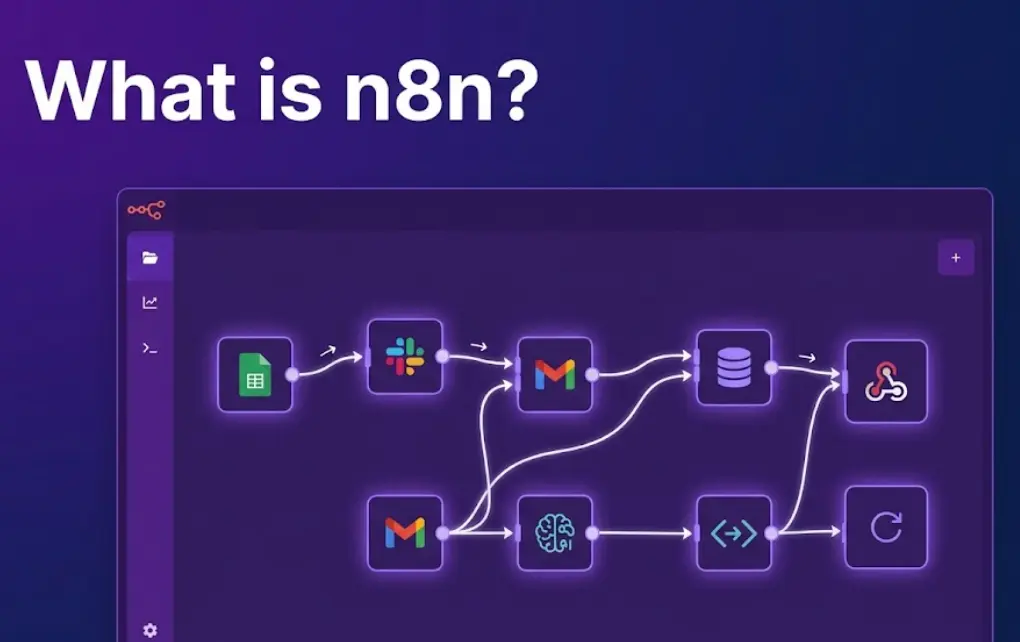
The canvas interface: All of this happens on a drag-and-drop visual canvas. You see your entire workflow laid out as a flow diagram — each node is a box, arrows connect them, and you can click any node to inspect its configuration, inputs, and outputs. Debugging is visual: you can see exactly what data flowed through each step.
What You Can Automate with n8n: Real Use Cases
n8n is general-purpose — it works across almost any industry and department. Here are the most common real-world categories:
Lead & CRM Automation
Capture form submissions, enrich lead data, create CRM contacts, assign to sales reps, and send follow-up emails — all without touching a screen.
Notifications & Alerts
Send Slack, Teams, or email alerts when something important happens — a server goes down, a deal closes, inventory drops below threshold, or a task is overdue.
Reporting & Data Sync
Pull data from multiple sources, transform it, and push it into dashboards, Google Sheets, or databases on a schedule. Replace manual copy-paste reports forever.
E-commerce Workflows
Sync orders between platforms, trigger fulfillment actions, send personalised post-purchase emails, update inventory across channels, and flag fraud patterns.
AI-Powered Workflows
Route customer support messages through an LLM for classification, generate content drafts from templates, summarise long documents, or build a multi-step AI agent pipeline.
HR & Onboarding
Automate new-hire onboarding: create accounts, send welcome emails, assign tasks in your project management tool, and add to the right Slack channels — triggered by an HRIS event.
API & Webhook Integrations
Connect services that have no native integration by using HTTP nodes. If a service has an API, n8n can call it, process the response, and pass data to the next step.
Database Operations
Read from and write to PostgreSQL, MySQL, MongoDB, Supabase, or any SQL database. Build event-driven workflows that react to database changes in real time.
The pattern in every case is the same: something happens → n8n detects it → n8n performs one or more actions automatically. Once a workflow is active, it runs 24/7 without any human input.
Build AI-Powered Apps & Workflows — No Code Required
Our n8n course teaches you to build real automations and apps using no-code tools, AI APIs, and visual builders. Module 0 is completely free — no credit card needed.
Start Free Lesson →n8n vs Zapier vs Make — Honest Comparison
These are the three dominant tools in workflow automation in 2026. They overlap significantly but differ in important ways:
| Feature | n8n | Zapier | Make (Integromat) |
|---|---|---|---|
| Open source | ✓ Yes | ✗ No | ✗ No |
| Self-hostable | ✓ Yes — free | ✗ No | ✗ No |
| Free tier limits | ✓ Unlimited (self-host) | ~ 100 tasks/mo | ~ 1,000 ops/mo |
| Custom code | ✓ JS & Python | ~ JS (paid plans) | ~ Limited |
| Visual canvas | ✓ Node-based | ~ Linear steps | ✓ Visual flow |
| Branching logic | ✓ Advanced | ~ Basic (paid) | ✓ Good |
| AI / LLM nodes | ✓ Built-in (OpenAI, Claude, etc.) | ~ Via Zaps | ~ Via modules |
| Native integrations | 400+ | 6,000+ | 1,500+ |
| Ease of setup | ~ Medium | ✓ Easiest | ~ Medium |
| Data privacy | ✓ Self-host = your server | ✗ Zapier's cloud | ✗ Make's cloud |
| Starting price (cloud) | $20/mo | $20/mo | $9/mo |
| Best for | Developers, data-sensitive workflows, complex logic | Quick non-technical automations | Visual complex flows, budget-conscious |
When to choose n8n over Zapier
Honest guidance — not a sponsored comparisonChoose n8n when…
- You need self-hosting for data privacy compliance
- You want unlimited executions without per-task costs
- Your workflow needs custom JavaScript or Python logic
- You're building complex multi-branch automations
- You want to integrate AI models directly into workflows
- You're a developer comfortable with setup overhead
Choose Zapier when…
- You need the widest possible app library (6,000+ Zaps)
- You want the fastest possible setup with no technical overhead
- Your team is non-technical and won't maintain a self-hosted server
- Your workflows are simple, linear, and don't need branching
- You're connecting popular consumer apps (Gmail, Sheets, Slack)
n8n Pricing: Free, Cloud, and Self-Hosted
n8n has a genuinely flexible pricing model. Here's what each option actually means:
Self-Hosted — Free Forever
Run n8n on your own server, VPS, or locally via Docker or npm. Zero cost. Unlimited workflows. Unlimited executions. No per-task charges. You own the data, you own the infrastructure. The trade-off: you're responsible for setup, updates, and uptime. For most developers, a $5–10/mo VPS is enough to run n8n reliably for dozens of workflows.
n8n Cloud — Managed Hosting
n8n manages the server for you. Plans start at $20/mo for 2,500 executions/month. Grow plan at $50/mo includes 10,000 executions. Power plan at $120/mo for 50,000 executions. Cloud is the right choice if you want n8n's power without managing infrastructure — and your team can't or won't maintain a self-hosted instance.
n8n Enterprise — For Organisations
Enterprise plan adds SSO, advanced permissions, audit logs, custom branding, dedicated support, and SLA guarantees. Priced per contract. Enterprise customers typically run self-hosted at scale — internal IT teams, SaaS companies building automation as a product feature, or organisations with strict data governance requirements.
Recommendation for beginners: Start with n8n Cloud's free trial to learn the interface without any setup friction. Once you understand how n8n works, evaluate whether self-hosting makes sense for your volume and data requirements. Most individuals and small teams who build more than 5–10 workflows find self-hosting on a cheap VPS pays for itself within the first month.
How to Get Started with n8n
There are two practical paths. Choose based on your comfort level:
Path A: n8n Cloud (fastest — 5 minutes)
No installation, no server, instant startSign up at n8n.io/cloud
Create a free account. No credit card required for the trial. You get a fully functional n8n instance running in the cloud immediately.
Open the editor and create a new workflow
Click "New workflow". The canvas opens. Click the "+" button to add your first trigger node — start with something simple like a Schedule trigger (runs on a time interval) or a Webhook trigger.
Add action nodes and connect them
Drag an action node onto the canvas. Search for the app you want (e.g. Gmail, Slack, Google Sheets). Authenticate with your account. Configure what the node should do. Connect it to the trigger with an arrow.
Test and activate
Click "Execute Workflow" to test manually. Inspect each node's output to confirm the data looks right. When it works, flip the Active toggle. The workflow now runs automatically according to your trigger.
Path B: Self-Hosted with Docker (free, ~10 minutes)
Best for developers comfortable with command lineIf you have Docker installed, running n8n locally takes one command:
docker run -it --rm \
  --name n8n \
  -p 5678:5678 \
  -v ~/.n8n:/home/node/.n8n \
  n8nio/n8n
Open http://localhost:5678 in your browser. n8n is running. Your workflows and credentials are stored in ~/.n8n on your machine — fully private.
To run it persistently on a server, use docker-compose with a restart policy. The official n8n documentation has a full self-hosting guide with PostgreSQL persistence and reverse-proxy setup for production use.
n8n and AI: Building AI Workflows in 2026
One of the most significant developments in n8n over the past two years has been deep AI integration. n8n now has native nodes for OpenAI, Claude (Anthropic), Google Gemini, Mistral, HuggingFace, and any custom LLM via HTTP. This makes it straightforward to build workflows where AI is an active processing step — not just a trigger or destination.
🤖 AI Agent Workflows
n8n supports the "AI Agents" pattern: an LLM can decide which n8n tools (nodes) to call, process the results, and loop until it completes a goal. You can build customer support agents, research agents, or data enrichment agents where AI coordinates the workflow rather than just generating text.
📝 Content Generation Pipelines
Trigger on a schedule or a new Notion page, pull in data from multiple sources, pass it to an LLM with a structured prompt, get back formatted output, and publish it to WordPress, Webflow, or a CMS — entirely automated. Content teams use this to produce first-draft articles, social posts, and product descriptions at scale.
🔍 Intelligent Data Routing
Use an LLM to classify incoming data — support tickets, emails, customer feedback — and route each item to the right downstream action. High-urgency tickets go to Slack, low-priority ones go to a Jira board, billing questions go to the finance team. AI does the classification; n8n does the routing.
🗄️ RAG & Vector Database Workflows
n8n integrates with Pinecone, Qdrant, Weaviate, and other vector databases. You can build document ingestion pipelines (chunk → embed → store) and retrieval pipelines (embed query → retrieve relevant chunks → pass to LLM → return answer) entirely within n8n, without custom code.
The combination of n8n's workflow orchestration with AI models is becoming a serious alternative to writing custom application code. Teams that previously needed a developer to build an AI feature can now prototype it in n8n in hours — and in many cases, ship it to production directly from there.
n8n + AI Apps: If you're learning to build AI-powered applications, n8n is an excellent complement to tools like FlutterFlow. Build the app front-end in FlutterFlow; use n8n to handle the backend automation, data processing, and AI orchestration. Our n8n course covers this full stack — from front-end to AI-powered backend workflows.
Frequently Asked Questions
What is n8n used for?
n8n is used to automate workflows between apps and services. Common use cases: form submissions to CRM, Slack notifications from database events, AI-powered content pipelines, scheduled data syncs, e-commerce order processing, and HR onboarding automation. It supports 400+ native integrations and can connect to any service with an API via HTTP nodes.
Is n8n free to use?
The self-hosted version of n8n is completely free — unlimited workflows, unlimited executions, zero cost beyond your server. Run it locally with Docker or on a $5–10/mo VPS. The n8n Cloud managed plan starts at $20/mo with 2,500 executions. For most developers and technical teams, self-hosting is the best value option.
How is n8n different from Zapier?
n8n is open-source and self-hostable; Zapier is cloud-only. n8n supports custom JavaScript and Python code inside workflows; Zapier does not on standard plans. n8n has no per-execution costs when self-hosted; Zapier charges per Zap run. n8n supports advanced branching logic and AI agent workflows. Zapier has a larger app library (6,000+) and the easiest onboarding — best for non-technical teams with simple automations.
Do I need to know how to code to use n8n?
No coding is required for most n8n workflows. The visual canvas lets you connect nodes by dragging and dropping. Standard automations — form to CRM, webhook to Slack, scheduled reports — need zero code. A Code node is available for custom logic, but it's optional. Basic coding knowledge (JavaScript or Python) unlocks more power, but beginners can build genuinely useful automations without it.
Related Articles
Best No-Code App Builders in 2026: FlutterFlow vs Bubble vs Adalo vs Thunkable
Honest comparison of the 4 leading no-code app builders. Pricing, capabilities, and which to choose.
Can AI Build an App For You? Yes — Here's Exactly How
How AI app generation works in 2026, which tools do it best, and what you still need to handle yourself.
Python vs Excel vs No-Code: What to Choose for Automation
Honest 2026 comparison with 7 real scenarios and a decision framework to pick the right tool.
Ready to Build AI-Powered Apps & Automations?
The LearnForge n8n course takes you from zero to building real apps and workflows — using FlutterFlow, n8n, AI APIs, and no-code tools. Module 0 is completely free. No credit card needed.
Try Free Lesson →