Best No-Code App Builders in 2026: FlutterFlow vs Bubble vs Adalo vs Thunkable
Four platforms dominate the no-code app building space in 2026 — but they solve very different problems. This is an honest, side-by-side comparison of FlutterFlow, Bubble, Adalo, and Thunkable: what each one actually builds, what it costs, where it falls short, and which one you should start with.
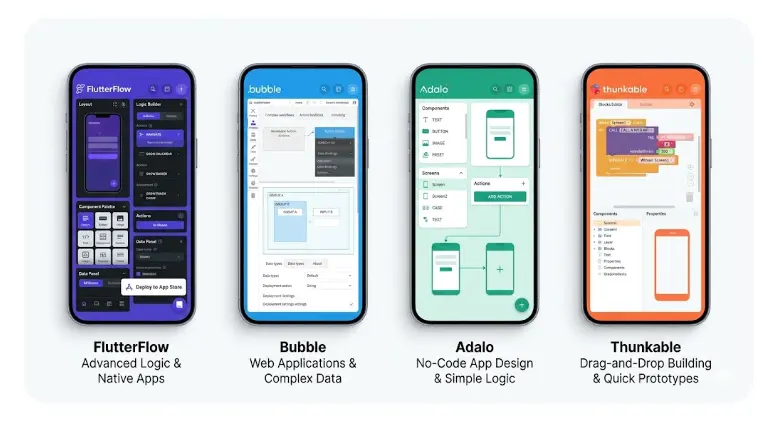
No-Code App Building in 2026
In this article
- What "no-code app builder" actually means in 2026
- FlutterFlow — best for real iOS & Android apps
- Bubble — best for complex web apps
- Adalo — best for simple mobile apps on a budget
- Thunkable — best for beginners and educators
- Full side-by-side comparison table
- Which no-code builder to choose — decision guide
- FAQ
What "No-Code App Builder" Actually Means in 2026
The term "no-code" covered a lot of weak tools five years ago — drag-and-drop editors that produced toy apps you couldn't publish to the App Store. In 2026, the category has matured dramatically. The platforms in this comparison build real, production apps used by real businesses with real users.
FlutterFlow compiles to native Flutter code — the same technology Google uses for Google Pay. Bubble powers real SaaS startups that have raised venture capital. Adalo has tens of thousands of published apps in the App Store and Google Play. Thunkable has been used by students and educators in 200+ countries to build functional tools.
The honest caveat: these tools are not equivalent to custom development for every use case. They excel at standard app patterns — user authentication, database-driven screens, CRUD operations, push notifications, payments via Stripe. They hit limitations when you need highly custom algorithms, specialized hardware integrations, or sub-10ms performance requirements. For 80%+ of apps people actually want to build, they work extremely well.
How to read this comparison: Each tool below gets an honest assessment — what it does best, where it falls short, and who it's for. This is not a sponsored ranking. At the end, there's a decision guide to help you pick based on your specific situation.
FlutterFlow — Best for Real iOS & Android Apps
FlutterFlow
Visual builder → real Flutter code → App Store & Google PlayFlutterFlow is a visual app builder where you design screens using drag-and-drop components — and underneath, it compiles everything into real Flutter code. This matters because Flutter is Google's cross-platform framework used in production apps at scale. Your FlutterFlow app isn't a web wrapper or a PWA — it's a genuine native app that runs on both iOS and Android from a single project.
The AI generation layer added in 2025 makes FlutterFlow particularly powerful: describe a screen or a feature in plain English, and the AI generates it within the visual editor. The generated output is immediately editable — you're not locked into the AI's choices. You can export the full Flutter codebase at any time, meaning you're never locked into the platform.
What FlutterFlow does best: Multi-screen mobile apps with user authentication, Firebase or Supabase databases, push notifications, payments, and maps. Marketplace apps, booking tools, community platforms, fitness trackers, delivery apps — anything with a database and a user login. Paired with a structured AI apps course, it's the fastest path from idea to App Store for a non-developer.
Pricing: Free plan (projects with watermark, limited features). Starter: $30/mo. Pro: $70/mo. Teams: from $200/mo. Annual billing saves ~20%. Apple Developer account ($99/year) required to publish to iOS.
✓ Strengths
- Publishes native iOS + Android apps
- AI screen & logic generation
- Real Flutter code — no lock-in
- Firebase + Supabase + REST APIs
- Stripe payments built in
- Strong, active community
- Deep documentation + video tutorials
✗ Limitations
- Weaker for complex web apps
- Learning curve steeper than Adalo
- Paid plan required for production
- Some advanced custom code needed for edge cases
- Testing on real device required (can't skip)
Bubble — Best for Complex Web Apps
Bubble
Most powerful no-code web app builder — full database + workflowsBubble is the most technically capable no-code platform available in 2026. It gives you a full relational database, a visual workflow engine (if-this-then-that logic that can handle complex business rules), a rich component library, and the ability to connect to virtually any external API. There's no limit to how complex your app logic can be — some Bubble apps handle millions of users.
The trade-off is learning curve. Bubble has a steeper onboarding than any other platform in this comparison. The interface is dense, the data system works differently from what most people expect, and debugging workflows requires patience. Most people need 4–8 weeks of consistent learning before they feel comfortable shipping in Bubble.
What Bubble does best: Multi-sided marketplaces (Airbnb-style, Upwork-style), SaaS products with complex subscription logic, B2B tools with role-based permissions, apps where the business logic is the core product rather than just the screens. Bubble is built for the web first — the mobile experience is responsive but not native.
Pricing: Free plan (Bubble branding in URL, limited capacity). Starter: $29/mo. Growth: $119/mo. Team: $349/mo. Capacity (server resources) is billed separately on higher-traffic apps — this can add $50–500+/mo for serious production apps.
✓ Strengths
- Most powerful no-code logic engine
- Full relational database
- Complex workflows and business rules
- Huge plugin ecosystem
- Scales to real production traffic
- Large community + tutorials
- Native API integrations
✗ Limitations
- Steep learning curve
- Web-first — no native mobile apps
- Can get expensive at scale
- Performance requires careful optimization
- No code export
Adalo — Best for Simple Mobile Apps on a Budget
Adalo
Simplest drag-and-drop mobile builder — great for quick MVPsAdalo is the most beginner-friendly mobile app builder in this comparison. The interface is clean and intuitive — you drag components onto a phone screen canvas, link screens together, and connect a simple database. Someone with zero technical background can go from opening Adalo for the first time to a working app preview in under two hours.
The trade-off is ceiling. Adalo's database is basic (no complex relations), the logic system is limited compared to Bubble or FlutterFlow, and performance on data-heavy apps is noticeably slower. It publishes to both iOS and Android, but the underlying technology is a web wrapper (React Native) — which means it works well for simple apps but starts to strain on anything complex.
What Adalo does best: MVPs and proof-of-concept apps, internal company tools, simple booking or directory apps, apps you need to demo quickly to validate an idea before investing in a more capable platform. If you're not sure your idea will work and need to test it cheaply and fast, Adalo is a solid starting point.
Pricing: Free plan (200-record database limit, Adalo branding). Starter: $36/mo. Professional: $52/mo. Team: $200/mo. The record limit on the free plan is the most restrictive in this comparison — you'll hit it quickly with a real app.
✓ Strengths
- Easiest to learn — fastest to first app
- Clean, intuitive interface
- Publishes iOS + Android
- Good for validating app ideas
- Component marketplace
- Simple database setup
✗ Limitations
- 200-record free tier is very limited
- Basic database — no complex queries
- Limited logic and workflows
- Performance slow on large data sets
- React Native wrapper — not truly native
- Fewer integrations than competitors
Thunkable — Best for Beginners and Educators
Thunkable
Drag-and-drop logic blocks — designed for learning and prototypingThunkable is the platform of choice for educators, coding bootcamps, and complete beginners who want to understand how apps work without being overwhelmed by a professional tool. Its distinguishing feature is a Scratch-like block-based logic system: instead of writing code, you snap together visual blocks that represent actions ("when button is clicked, navigate to screen 2"). This makes app logic visible and understandable for people with no programming background.
Thunkable has improved substantially — it now supports Firebase, local device storage, sensors (camera, GPS, microphone), payments, and publishing to both iOS and Android. For simple apps, it competes reasonably well. Where it falls behind is in visual design quality — Thunkable apps tend to look more basic, and the design customisation is limited compared to FlutterFlow or even Adalo.
What Thunkable does best: Teaching app development concepts, building functional prototypes for demo purposes, simple utility apps, apps built by students or non-designers who prioritise learning the logic over visual polish. Also a strong choice for building internal tools where appearance matters less than function.
Pricing: Free plan (5 projects, Thunkable branding). Starter: $13/mo. Pro: $38/mo. Business: $63/mo. Most affordable paid tier in this comparison — a real advantage for learners and educators.
✓ Strengths
- Best for learning — block logic is visual
- Most affordable paid plan ($13/mo)
- Publishes iOS + Android
- Good sensor access (camera, GPS)
- Firebase and local storage support
- Strong for educators
✗ Limitations
- Limited visual design control
- Apps look less polished
- Fewer integrations than FlutterFlow
- Block logic gets messy at scale
- Smaller community than competitors
- Not suited for production-grade apps
Build Your First Real App — With AI + No-Code
Our AI Apps course teaches FlutterFlow from scratch: screen design, databases, authentication, AI-assisted generation, and how to publish to the App Store. Module 0 is completely free — no credit card needed.
Start Free Lesson →Full Side-by-Side Comparison
Here's every key dimension compared across all four platforms — so you can see at a glance which tool fits your situation.
| Feature | FlutterFlow | Bubble | Adalo | Thunkable |
|---|---|---|---|---|
| Native iOS app | ✓ Yes | ✗ Web only | ~ Wrapper | ~ Wrapper |
| Native Android app | ✓ Yes | ✗ Web only | ~ Wrapper | ~ Wrapper |
| Web app | ~ Basic | ✓ Excellent | ~ Limited | ~ Limited |
| AI generation | ✓ Built-in | ~ Beta | ✗ No | ✗ No |
| Code export | ✓ Full Flutter | ✗ No | ✗ No | ✗ No |
| Database power | ✓ Firebase/Supabase | ✓ Full relational | ~ Basic | ~ Firebase |
| Workflow / logic | ✓ Strong | ✓ Best in class | ~ Simple | ~ Block-based |
| Design quality | ✓ Professional | ✓ Good | ~ Decent | ~ Basic |
| Learning curve | ~ Medium | Steep | ✓ Easy | ✓ Very easy |
| Free tier | With watermark | With branding | 200 records | 5 projects |
| Starting price | $30/mo | $29/mo | $36/mo | $13/mo |
| Stripe payments | ✓ | ✓ | ✓ | ~ Plugin |
| Push notifications | ✓ | ~ Web push | ✓ | ~ Limited |
| Best for | Mobile apps | Complex web apps | Simple MVPs | Learning |
Key insight: FlutterFlow is the only platform that produces truly native iOS and Android apps (real compiled Flutter code). Bubble wins on logic complexity. Adalo and Thunkable are entry-level tools — great for learning and validating ideas, but limited for production apps with real users.
Which No-Code Builder to Choose — Decision Guide
The right platform depends entirely on what you're building and where you are in your journey. Use this guide to make a confident decision:
You want to publish a real iOS or Android app
Choose FlutterFlow. It's the only platform in this comparison that compiles genuine native apps. If the App Store and Google Play are your destination, FlutterFlow is the clear choice. Start with a structured course to learn the platform efficiently — our AI Apps course covers the complete FlutterFlow workflow from first screen to store submission.
You're building a complex marketplace or SaaS web product
Choose Bubble. Multi-sided marketplaces, subscription SaaS, B2B tools with complex permissions — Bubble's workflow engine handles this category better than any other no-code tool. Budget 4–8 weeks to get comfortable with the platform before building seriously.
You want to validate an app idea as fast as possible
Choose Adalo. The easiest onboarding in this comparison. You can have a working prototype that demonstrates your core user flow within a single day — fast enough to show investors, potential users, or your team before committing to a more capable platform.
You're learning how apps work — or teaching others
Choose Thunkable. The visual block-based logic makes app programming concepts visible and understandable. The most affordable paid tier. Excellent for classrooms, workshops, and anyone who wants to understand the mechanics of app logic before moving to a more powerful platform.
You want AI to help build your app
Choose FlutterFlow. It's the only platform with mature, production-ready AI generation built in. Describe a screen or feature, AI generates it within the visual editor, you refine it. Combined with AI-assisted app building techniques, this is the fastest path from idea to working app in 2026.
The most common upgrade path
Many people start with Thunkable or Adalo to understand the basics, then move to FlutterFlow when they're ready to build something production-quality. If you know your destination is a real iOS/Android app, skipping straight to FlutterFlow with a good course is more efficient — you'll avoid rebuilding everything twice. If your destination is a web-first product with complex logic, Bubble is worth the steeper learning investment from the start.
Frequently Asked Questions
What is the best no-code app builder in 2026?
For native iOS and Android apps: FlutterFlow — real Flutter code, AI generation, App Store ready. For complex web apps: Bubble — best logic engine in no-code. For quick mobile MVPs: Adalo — easiest to learn. For education and prototyping: Thunkable — visual blocks, most affordable. Most people building their first real mobile app should start with FlutterFlow.
Is FlutterFlow better than Bubble?
They solve different problems. FlutterFlow is best for native mobile apps — it compiles to real Flutter code and publishes to the App Store and Google Play. Bubble is best for complex web applications with sophisticated business logic. For mobile: FlutterFlow wins. For complex web platforms: Bubble wins. For most first-time builders wanting a mobile app, FlutterFlow is the more practical choice.
Can you really build a professional app with no-code tools?
Yes. FlutterFlow apps compile to native Flutter — the same technology used by Google Pay and BMW's app. Bubble powers real SaaS companies with thousands of users. No-code tools handle 80–90% of common app patterns extremely well. They become limiting only for highly custom algorithms, specialized hardware integrations, or extreme performance requirements. For the vast majority of apps people want to build, they work professionally.
How much does it cost to build an app with no-code tools?
Platform costs: FlutterFlow from $30/mo, Bubble from $29/mo, Adalo from $36/mo, Thunkable from $13/mo. Add Apple Developer ($99/year) and Google Play ($25 one-time) for store publishing. Backend services like Firebase have generous free tiers for new apps. Total for a serious app: $30–150/month in platform fees — compared to $10,000–100,000+ for custom development. The ROI on no-code is substantial.
Related Articles
Can AI Build an App For You? Yes — Here's Exactly How
How AI app generation works in 2026, which tools do it best, and what you still need to handle yourself.
How to Create an iOS App Without Coding in 2026
Full step-by-step guide to building and publishing on iOS using FlutterFlow, Adalo, and Bubble.
How to Build and Publish an Android App for Free
MIT App Inventor, FlutterFlow, Google Play — build and ship for $25 total.
Ready to Build Your App with FlutterFlow + AI?
The LearnForge AI Apps course takes you from zero to published app — using FlutterFlow's AI generation, Firebase, and step-by-step guidance. No coding required. Module 0 is completely free.
Try Free Lesson →