n8n vs Make (Integromat): Full Comparison for 2026
Make rebranded from Integromat in 2022 and positioned itself as the "more powerful Zapier" — with a visual scenario builder that actually shows you what's happening between steps, instead of hiding it in a linear checklist. n8n arrived with a similar visual promise but a completely different philosophy: open source, self-hostable, and built for workflows that need to do real programming-like things without requiring you to actually program. They sit closer together on the spectrum than either does to Zapier, which makes the comparison genuinely interesting.
Short answer
Best for non-technical or semi-technical users who want more visual control than Zapier offers but aren't ready for a full node canvas. Make's scenario builder is genuinely intuitive, the app library is solid, and the free tier is hard to beat for light usage. Cloud-only, though.
Best when workflows need real branching logic, loops, custom code, AI agents, or data residency guarantees. Self-hosting is a genuine differentiator — you can run complex multi-step workflows with sensitive data on your own infrastructure, at any volume, without paying per-operation fees.
The honest summary: Make is where you go when Zapier feels too limited but n8n feels like too much. n8n is where you go when you've outgrown Make's pricing model, hit its logic limitations, or need to build something that looks more like an application than an automation. Many teams I've seen end up running Make for their client-facing, non-technical team members and n8n for everything that involves data transformations, APIs without native modules, or AI agents.
In this comparison
- What n8n and Make actually are
- Pricing — the operations trap and how n8n avoids it
- Visual builders: scenarios vs node canvas
- App integrations: 1,500+ vs ~400 native
- Workflow complexity: routers, iterators, error handling
- AI agent building — where n8n pulls ahead
- Self-hosting: n8n's biggest structural advantage
- Which one to use — by situation
- FAQ
What n8n and Make Actually Are
Make — originally called Integromat when it launched in 2012 in Prague — was built around a central insight that Zapier's linear list format hid too much. A Make "scenario" draws the automation as a visual diagram: modules connected by lines, with data flowing visibly between them. When something fails, you can see exactly which module failed and what data it received. When you add a router (Make's term for a conditional branch), you see the different paths laid out on screen. For users who had been frustrated debugging invisible Zapier failures, this was a revelation.
n8n came later (2019, Berlin) and kept the visual builder concept but went further in almost every direction: open source, self-hostable, with a proper node canvas that supports merging branches back together, running code in JavaScript or Python inside any node, and building full AI agent workflows using LangChain under the hood. Where Make's visual builder makes automations more transparent, n8n's canvas makes them more programmable — the gap is subtle to explain but obvious the first time you need to do something neither tool was originally built for.
Both charge for cloud usage, but the billing models differ in a way that compounds dramatically at scale. Make charges per operation — every module execution inside a scenario, including filters and transformations, counts against your monthly quota. n8n charges per workflow execution — the whole run, no matter how many nodes it passes through, counts as one. If this sounds like a minor accounting difference, it isn't: at moderate volume and workflow complexity, it's often the factor that decides which platform a growing team stays on.
A note on naming: Some users still search for "Integromat" — that's the same product as Make. The rebranding happened in 2022 when the company spun out from its parent and repositioned. Existing Integromat accounts were migrated to Make, and all core features carried over. If you're an Integromat veteran, you'll recognize Make's interface immediately.
Pricing — The Operations Trap and How n8n Avoids It
Make's pricing is structured around operations. Every time a module executes inside a scenario — including aggregators, iterators, filters, and transformations — it counts as one operation. A scenario that receives a webhook, parses a JSON body, queries a database, formats the result, sends a Slack message, and writes to a Google Sheet has six modules. Run it 2,000 times in a month and you've consumed 12,000 operations. Make's free plan gives you 1,000 operations per month; the Core plan ($10.59/month) covers 10,000 ops; the Pro plan ($18.82/month) gives you 40,000 ops.
At first glance that looks generous — and for genuinely simple 2-3 module scenarios at low volume, it is. The problem surfaces as workflows grow. A realistic lead-processing scenario I built for a client had 11 modules: webhook → parse → CRM lookup → two conditional branches → data enrichment call → normalize → write to spreadsheet → send email → log to Airtable → send internal Slack notification. Eleven modules. Run 1,000 times per month = 11,000 operations. Already past the Core plan and into Pro territory for a scenario that's not even particularly complex by automation standards.
Real-world pricing example: a 6-module lead-routing scenario, 1,000 runs/month
Make's pricing isn't unreasonable for the product it is — the per-operation model makes sense when you're a cloud service processing every individual module execution. But it creates a dynamic where optimizing Make scenarios for cost starts to conflict with building the most logical workflow: adding a module that would make a scenario cleaner or more readable costs you operations. I've seen teams start removing useful transformation steps purely to stay on a lower Make tier, which isn't a trade-off you should be making.
One area where Make genuinely has an edge: the free tier. Make's free plan allows 1,000 operations and unlimited scenarios (with 2 active at a time), running every 15 minutes. n8n's cloud free plan is more limited; for serious free usage, n8n really shines when self-hosted, which requires a bit more technical setup. For a solo builder testing ideas with light automation volume, Make's free tier is harder to beat.
Learn to Build Real Automations and AI Agents with n8n
The LearnForge AI Apps course teaches you to build production workflows and AI agents with n8n from scratch. No prior experience needed. Module 0 is completely free.
Try Free Lesson →Visual Builders: Scenarios vs Node Canvas
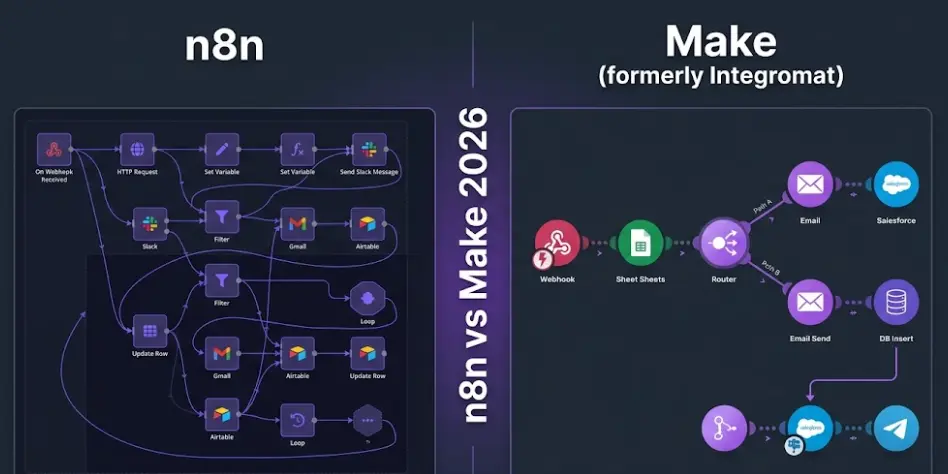
Both tools are "visual," but the word covers a wide range. Make's scenario builder draws automation as a left-to-right flow of circular module icons connected by lines, with data passing between them. You can see what's feeding into each module, add filters between steps, and when you add a router the branching paths radiate outward from a single point. It's genuinely well-designed for its target audience: you understand what the automation is doing at a glance, even if you haven't built it yourself.
n8n's canvas is more like a whiteboard than a diagram template. Nodes are rectangular, can be placed anywhere, and connect via manually drawn lines. Branches can split from any output port, converge back together with Merge nodes, loop, or trigger sub-workflows. The difference becomes clear when you try to build a workflow where three different paths all eventually feed into the same final step: in Make, all three branches run to their own ends; in n8n, you draw three lines into a Merge node and continue. That structural difference isn't cosmetic — it changes what workflows you can build without resorting to workarounds.
Make's interface is faster to learn for non-developers. The module search is well-organized, the field-mapping UI is clean, and the scenario preview (which shows you exactly what data each module received and sent on the last run) is one of the best debugging experiences in any automation tool. n8n has improved its UI considerably over the past two years, but the canvas still demands more from the user upfront — you need to understand expressions ({{ $json.fieldName }}), know that items are arrays by default, and think about how data transforms as it passes through the graph.
Scenario history and execution debugging
One thing Make genuinely does better than n8n out of the box: the execution history interface. Every scenario run is logged, and clicking on any historical run shows you a step-by-step replay of exactly what data flowed through each module, including the input and output of every transformation. Finding out why a specific run produced the wrong output is a matter of clicking into the run and tracing the data.
n8n has execution logs too, and recent versions have improved the execution data viewer substantially. But Make's execution history UI is more polished and easier to use for non-technical team members who need to investigate why an automation produced the wrong result last Thursday — they don't need help to navigate it.
Make wins on execution debugging UXCanvas flexibility and workflow expressiveness
Make's scenario diagram, for all its clarity, is constrained. Paths branch but don't easily re-merge. Loops are handled via Make's Iterator and Aggregator modules, which work but require you to think about aggregation explicitly whenever you want to collect results from looped iterations back into one output. In n8n, a Split In Batches node iterates naturally, and collecting results back doesn't require a special module — you route the output forward like any other node.
The deeper difference: n8n workflows can look like programs, because in some sense they are. A workflow that runs a database query, iterates over 200 results, applies different logic to each based on a field value, retries any failed API calls three times with exponential backoff, and then sends one consolidated report — that's one n8n canvas. In Make, it's a collection of linked scenarios and webhook calls that's significantly harder to maintain.
n8n wins on workflow expressivenessApp Integrations: 1,500+ vs ~400 Native
Make has roughly 1,500 native app modules, compared to n8n's approximately 400. That's a meaningful gap — Make's library is deeper, maintained by a larger team, and covers more niche tools. In the comparison with Zapier's 7,000+ apps it looks thin, but positioned against n8n, Make's 1,500 is a real advantage for users who need native modules for non-mainstream tools.
In practice, the gap shrinks considerably. The vast majority of SaaS products that automation users care about — CRMs, project management tools, communication platforms, data stores, payment processors, email services — have either a native n8n node or a well-documented REST API that n8n's HTTP Request node handles cleanly. I've connected n8n to Pipedrive, Freshdesk, Typeform, Intercom, Stripe, Monday.com, and a custom internal API at a fintech client — none of them required more than reading the API docs and configuring the HTTP node's authentication. The cases where Make's larger library genuinely saves you time are for tools with unusual OAuth flows, undocumented APIs, or proprietary data structures that Make's team has already reverse-engineered.
Integration coverage at a glance
| Category | Make | n8n |
|---|---|---|
| Total native integrations | 1,500+ modules | ~400 nodes |
| Major CRMs (HubSpot, Salesforce, Pipedrive) | Full native support | Full native support |
| Niche or regional SaaS apps | Better coverage | HTTP node as fallback |
| Custom / internal APIs | HTTP module (functional) | HTTP node + code nodes |
| Community-built integrations | Limited | Active community node ecosystem |
| Custom API without documentation | Possible but harder | Code nodes handle edge cases |
One important nuance: Make's native modules often handle pagination, rate limiting, and authentication renewals for you automatically. When n8n uses the HTTP Request node for a service without a native node, you may need to handle these manually — adding a loop to paginate through results, for example, or configuring OAuth token refresh yourself. For developers this is fine; for non-technical users building their first automations, it's a real friction point.
Workflow Complexity: Routers, Iterators, and Error Handling
Make handles moderate workflow complexity well. Its Router module lets you define multiple conditional paths, each with filter conditions, and the visual diagram makes the branching clear. The Iterator module processes arrays element by element, and the Aggregator module collects the results back together. For a large portion of real-world automations, this covers what you need.
Loops that produce data for later steps
Make's Iterator/Aggregator pattern works, but it has a fundamental constraint: the Aggregator must know in advance what it's collecting (array of strings, array of numbers, a custom structure). If you want to run a loop where each iteration hits an API, transforms the response, and you want all the results combined into one object for a final step, you need to think carefully about what aggregation function produces what you need. I've spent time debugging Make scenarios where the Aggregator was producing nested arrays instead of flat ones because of how the Iterator exposed the data.
n8n's approach is different: data flows between nodes as arrays of items by default, and the Split In Batches node handles chunked processing naturally. The output of a loop is just more items flowing forward, no explicit aggregation step needed in most cases.
n8n wins on loop and data-merge flexibilitySimple conditional branching with clear visual output
For workflows where "if condition A, do X; if condition B, do Y; otherwise do Z" covers your logic — and where those branches don't need to recombine — Make's Router is clean, fast to build, and easy to explain to a non-technical colleague. Adding conditions uses a filter UI that requires no expression syntax, just field selections and comparison operators.
n8n's IF and Switch nodes accomplish the same thing, but the expression editor for conditions requires familiarity with the {{ $json }} syntax. A developer finds this natural; someone from a marketing operations background might find Make's filter UI more approachable for their first few automations.
Both have it — different approaches
Make lets you add error handlers to individual modules and configure what happens when a scenario fails: stop, ignore the error, break and resume, or roll back a transaction (for supported modules). The error handler is visible in the scenario diagram, which helps. What Make doesn't easily support is routing failed items down a separate processing path within the same scenario — errors tend to stop or skip the affected module rather than flowing to custom recovery logic.
n8n lets you attach error workflows that trigger whenever any node fails, configure per-node retry counts and intervals, and route individual failed items through separate error-handling branches while the rest of the data continues normally. For automations processing hundreds of records where a few API calls will inevitably fail, n8n's error handling is more surgical.
Both adequate · n8n more granular for high-volume flowsAI Agent Building — Where n8n Pulls Ahead
Both platforms have added AI capabilities — this is 2026, everything has AI capabilities — but the depth of the implementations is very different. Make has modules for OpenAI, Anthropic Claude, and Google Gemini that let you add LLM-powered steps inside a scenario: summarize an email, extract structured data from a document, classify a support ticket, draft a reply. These work reliably and are easy to configure. What they produce is an automation that uses AI at a step, not an AI agent that controls its own workflow.
n8n's AI Agent node is built on LangChain and creates a genuinely different thing: an agent that receives a goal, reasons about which tools to invoke, calls those tools (which can be other n8n workflows, HTTP requests, vector database lookups, calculations, web searches — whatever you wire in), observes the results, and decides what to do next. The LLM isn't a step in the automation; it's the controller of the automation. Memory nodes let the agent maintain context across sessions — a buffer for short-term memory, a vector store for long-term retrieval of past interactions.
I built a document processing agent with n8n that handles incoming contracts: it reads the document, identifies clauses that match a set of risk criteria (stored in a vector database of past flagged clauses), asks the AI to assess risk level with reasoning, and routes high-risk documents to a legal review queue while auto-approving low-risk ones. The entire logic of what gets flagged and why is controlled by the LLM, not by hard-coded conditions. That's genuinely not possible to build in Make's current architecture — there's no equivalent to n8n's AI Agent node that gives the LLM tool-calling authority over the workflow itself.
Why this matters for the course context: Building AI agents that take real actions — not just LLM API calls inside automations, but agents that reason, use tools, and make decisions — is one of the fastest-growing practical skills in automation right now. The platform you learn on shapes what you can build later. n8n is the only tool of the three (Make, Zapier, n8n) that gives you a proper agent-building environment without writing code.
Self-Hosting: n8n's Biggest Structural Advantage
Make is cloud-only. Every scenario you run, every piece of data that flows through it, passes through Make's infrastructure. For most businesses and most use cases, this is completely acceptable — Make has a solid security posture and privacy policy, and the vast majority of automation data isn't sensitive enough to warrant concern. But "acceptable" and "required" are different things.
When you're processing customer financial data, healthcare records, legal documents, or anything else with genuine data residency requirements — GDPR, HIPAA, contractual data-handling agreements — "cloud-only" stops being a preference question and becomes a blocker. n8n can run entirely inside your own infrastructure. Docker on a $5/month VPS for simple use cases, your company's internal server for anything involving sensitive data, Kubernetes for high-volume production deployments. The automation engine, your credentials, and all workflow execution data never have to leave the network you control.
Beyond compliance, self-hosting changes the cost equation entirely. n8n's fair-code license allows free self-hosting for most use cases (commercial use at scale requires a commercial license, but individual and small-team use is free). Running n8n on a $10/month VPS with automated backups and HTTPS via Caddy is realistically a half-day setup, and after that it's a "check on it monthly" maintenance burden. At any non-trivial workflow volume, the cost difference compared to Make's per-operation pricing is substantial enough to justify the setup time.
Hosting options side by side
| Option | Make | n8n |
|---|---|---|
| Cloud managed | Yes (only option) | Yes — n8n Cloud |
| Self-hosted on own server | Not available | Yes — Docker, npm, or binary |
| Data stays in your infrastructure | No | Yes (self-hosted) |
| GDPR / HIPAA data residency | Cloud compliance only | Full control when self-hosted |
| Cost at high volume (self-hosted) | N/A | ~$10/mo VPS, unlimited executions |
One thing worth being honest about: self-hosting n8n is not zero-effort. Updates need to be applied periodically, you're responsible for backups and uptime, and if n8n breaks at 2am on a Saturday because of an OS-level issue, that's your problem to solve. For a non-technical user or a small team without any DevOps capacity, Make's fully-managed cloud removes that entire category of concern. n8n Cloud sits in the middle — you get the tool's full flexibility without managing a server, at a per-execution cost that's still better than Make's per-operation model at moderate complexity.
Which One to Use — By Situation
Your team is non-technical and will build their own automations
Make. Its scenario builder, filter UI, and execution history are the most polished experience for non-developers among the major automation platforms. A marketing ops person or operations coordinator can get productive in Make after a few hours without any technical coaching. n8n's expression syntax and JSON data model require more investment before a non-developer feels in control.
You're running multi-step automations at moderate to high volume and cost matters
n8n — especially self-hosted. Once workflows have more than 4-5 modules and volume climbs past a few thousand runs per month, Make's per-operation pricing compounds fast. The exact same automation in n8n Cloud costs a fraction of the equivalent Make plan, and on a self-hosted VPS the ongoing cost is negligible. If you've looked at a Make invoice and been surprised by how quickly operations add up, you've hit the threshold where n8n pays for its setup cost within a month or two.
You want to build AI agents that reason and take actions
n8n, clearly. Make's AI modules are for augmenting automations with LLM-powered steps — classification, generation, extraction. n8n's AI Agent node is for building agents that control their own workflow: pick tools, reason over results, maintain memory, and make autonomous decisions. If "AI agent" means anything beyond "LLM API call at step 3," n8n is the tool to build it in.
Your automations touch sensitive data that can't leave your network
n8n, self-hosted. This is non-negotiable — Make doesn't offer it. Whether it's healthcare data, financial records, or contractual data-handling requirements, the ability to run n8n entirely inside your own infrastructure is the only option that satisfies hard data residency constraints. Make's cloud security is solid, but it doesn't matter if the requirement is "data never touches third-party servers."
You rely heavily on niche SaaS apps and don't want to deal with API docs
Make has the edge here. Its 1,500+ native modules cover more of the long tail of SaaS tools, and the pre-built modules handle authentication and pagination so you don't have to. If you're automating workflows for a niche vertical — a specific real estate CRM, a regional shipping provider, an industry-specific ERP — Make's library is more likely to have a ready-made module. n8n's HTTP node can usually connect to anything with a REST API, but it requires reading the docs and configuring auth yourself.
Your workflows have complex branching that needs to re-merge, or process large lists
n8n. Make's Router handles splitting paths well, but paths don't easily merge back. n8n's Merge node and natural array data model handle convergence cleanly. If you're processing a list of records and want all results collected into one output before the next step — a common pattern in any data processing workflow — n8n's approach is more natural and less error-prone than Make's Iterator/Aggregator.
Frequently Asked Questions
Is n8n cheaper than Make?
For simple 1-2 module scenarios at low volume, Make's free tier (1,000 ops/month) is hard to beat. The pricing gap opens once workflows get more complex. Make bills per operation — every module run counts — so a 6-module scenario at 2,000 runs/month burns 12,000 operations, pushing past the Core plan ($10.59/mo) into Pro ($18.82/mo). n8n charges per execution: that same scenario at 2,000 runs counts as 2,000 executions, well inside Cloud Starter ($20/mo). Self-hosted n8n on a $10/month VPS has no per-execution costs at all.
Is Make easier to use than n8n?
For non-developers, yes — Make's scenario builder, filter UI, and execution history are more approachable than n8n's node canvas and expression syntax. Make sits between Zapier (easiest) and n8n (most powerful) on the complexity spectrum. For developers or technical users, n8n's learning curve is a few focused hours, after which its flexibility clearly justifies the investment. The question is really whether the user will spend more time learning the tool or hitting the tool's limits.
Can n8n replace Make?
For the vast majority of workflows, yes. Make's larger app library (1,500+ vs ~400 native nodes) is a real advantage for niche tools without documented APIs, but n8n's HTTP Request node covers most of that gap for anyone comfortable reading API documentation. Where n8n goes further: self-hosting, AI Agent building, workflow complexity without per-operation costs, and code nodes for custom logic. The main reason to stay with Make is its better UI for non-technical users and its pre-built modules for obscure SaaS tools.
Does Make have AI agent capabilities like n8n?
Make has AI-powered modules for OpenAI, Claude, and other LLMs — useful for adding generation, classification, or extraction steps inside a scenario. What Make doesn't have is n8n's AI Agent node: a LangChain-based framework where the LLM controls the workflow, decides which tools to call, and maintains memory across sessions. Make's AI augments automations; n8n's AI Agent node builds actual agents. If you need an agent that reasons and acts autonomously, n8n is the right tool.
Related Articles
n8n vs Zapier in 2026: Which One Should You Choose?
Pricing models, app integrations, AI agent capabilities, self-hosting — with real numbers and an honest verdict for each type of user.
n8n Pricing 2026: Free vs Cloud vs Self-Hosted — What You Actually Pay
Full n8n pricing breakdown with real execution math and honest cost comparison to Zapier and Make at different usage volumes.
How to Build AI Agents with n8n — Step by Step (No Code)
Build real AI agents with n8n's AI Agent node: memory types, connecting live tools, debugging ReAct, and a full production support agent example.
Build AI Apps and Automations From Scratch
The LearnForge AI Apps course covers n8n, FlutterFlow, and AI API integration — from zero to shipping real projects. No prior AI experience required. Module 0 is completely free.
Start Free Lesson →