FlutterFlow Review 2026: Can You Really Build a Real App With It?
FlutterFlow is the most talked-about no-code mobile app builder in 2026 — and for good reason. But the marketing version and the reality of using it daily are two different things. This is an honest review: what it produces, how the AI generation actually works, where it falls short, who it's right for, and whether the price is justified.
Quick Verdict
Bottom line: FlutterFlow is the best no-code builder for native iOS and Android apps in 2026. It produces real Flutter code, has mature AI generation, and is genuinely publishable to both app stores. The learning curve is steeper than Adalo or Thunkable, but what you can build in return is in a completely different league. At $30/month, the ROI is exceptional for anyone who would otherwise pay a developer.
In this review
What FlutterFlow Actually Is — and What It Produces
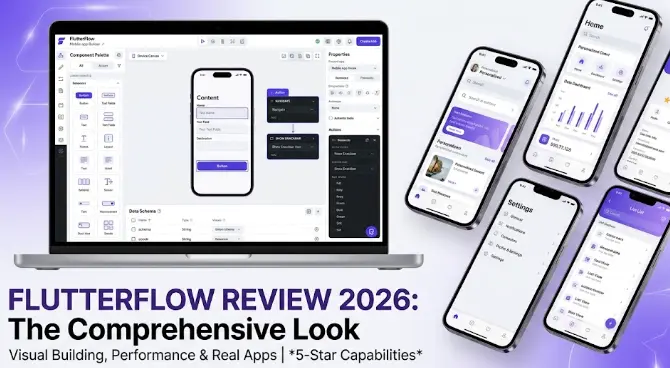
FlutterFlow is a visual app builder that compiles to real Flutter code. You design screens by dragging and dropping components — buttons, lists, forms, maps, images — and the platform generates Flutter/Dart code underneath. When you publish, your users get a genuinely native app that runs on iOS and Android with full performance.
This is the crucial distinction that separates FlutterFlow from platforms like Adalo or Thunkable: those tools produce web wrappers — apps that run a website inside a mobile shell, which limits performance and native device access. FlutterFlow produces compiled Flutter code — the same technology Google uses in its own apps (Google Pay, Stadia), and that BMW, eBay, and Alibaba use in their mobile products.
In practical terms: a FlutterFlow app feels like a real app. Animations are smooth, navigation is instant, and native device features (camera, GPS, push notifications, biometrics) work without workarounds. You can download the full Flutter codebase at any time — there's no lock-in, and a developer can continue building on your FlutterFlow project in any IDE.
What a FlutterFlow project includes
The honest summary: FlutterFlow is not a toy. Real businesses have built and scaled real apps with thousands of active users on it. What you give up compared to custom development is some architectural flexibility. What you gain is 10–20× faster delivery at a fraction of the cost.
Key Features in 2026
FlutterFlow has evolved significantly. Here's what's worth knowing about its core capabilities right now:
Visual Screen Builder
Drag-and-drop interface with a component library covering all standard UI patterns — lists, cards, forms, bottom sheets, modals, tabs, navigation drawers. Supports custom fonts, theming, and dark mode out of the box.
Database Integration
Deep Firebase Firestore integration — set up collections visually, define data types, and FlutterFlow auto-generates the read/write logic for your screens. Supabase support added in 2025. REST API connector for custom backends.
Actions & Logic
Visual action builder: on button tap → navigate to screen / write to database / call API / show dialog / send notification. Conditional logic, loops, local state — handles most app workflows without any code.
AI Generation
Describe a screen in plain English → AI generates the layout, components, and initial logic. Works at the screen level and for individual components. Refined significantly in 2025–2026. See Section 3 for honest assessment.
Payments
Native Stripe integration — one-time payments, subscriptions, and payment sheets. Works on both iOS and Android. Revenue Cat integration for in-app purchases and subscription management.
Custom Code & Widgets
When the visual builder hits a limit, you can add custom Flutter/Dart code blocks inline. The Marketplace has hundreds of pre-built widgets — charts, calendars, signature pads, barcode scanners — many free.
Feature ratings
AI Generation — Honest Assessment
FlutterFlow's AI generation is the feature most people ask about. Here's what it actually does — and where its current limits are.
✓ What AI generation does well
Describe a screen in plain English and the AI generates a complete layout with appropriate components, spacing, and visual hierarchy. This works best for standard patterns: a profile screen, a product list with filters, a booking form, a settings page, an onboarding flow. The generated output is 60–80% of the way to what you want — it gets the structure right and the components mostly right, but needs refinement on specific styling and logic.
You can also generate individual components: "Add a card that shows a user avatar, name, bio, and a follow button" — the AI inserts it directly into your canvas. And you can describe actions: "When this button is tapped, save the form data to the users collection and navigate to the home screen" — the AI builds the action flow.
✗ Where AI generation falls short
AI doesn't understand your specific business logic. It generates plausible structures based on your description, not your actual data model or user flows. The first generation is almost never production-ready — it needs human review and adjustment. Complex interactions ("when the user swipes right on a card, if they've already matched, show the match screen, otherwise add to pending list") require you to guide the AI carefully and often to build parts manually.
AI generation also doesn't set up your database automatically based on your description — you still define the Firebase collections manually, then connect them to screens. And the generated styling is generic — your app won't have a distinctive visual identity without manual design work after generation.
Realistic expectation: Use AI to generate the scaffold — the overall layout, the component structure, the initial action flows. Then refine manually. Treat AI generation as a very fast first draft, not a finished product. This mindset makes FlutterFlow's AI extremely useful rather than disappointing.
Pricing Breakdown — What You Actually Pay
FlutterFlow's official prices are straightforward. Here's the complete picture including the costs people miss:
Free
- 1 project
- FlutterFlow watermark
- No code download
- No store publishing
- AI generation included
- Good for learning only
Starter
- 1 active project
- No watermark
- Code download
- App Store publishing
- Firebase integration
- Full AI generation
Pro
- Unlimited projects
- Team collaboration
- Priority support
- Advanced components
- Custom domains
- All Starter features
Teams
- Multiple team members
- Role management
- Version history
- SSO support
- Dedicated support
- Custom contracts
⚠️ The costs people forget to budget for
Realistic total for a serious app: FlutterFlow Starter ($30/mo) + Apple Developer ($99/yr = ~$8/mo) + Firebase ($5–15/mo for a small active app) = roughly $43–53/month total. Compare that to hiring a developer: a basic app typically costs $15,000–60,000 to build. The ROI of FlutterFlow is not subtle.
Learn FlutterFlow the Right Way — With AI
Our AI Apps course teaches FlutterFlow from scratch: screen design, Firebase setup, AI generation, payments, and publishing. You'll build a real app from Module 1. Module 0 is completely free.
Try Free Lesson →Pros and Cons
A full picture — without the marketing spin:
✓ What FlutterFlow does exceptionally well
- Genuinely native output. Real compiled Flutter code — not a web wrapper. Performance, animations, and native features work properly.
- No lock-in. Export the full Flutter/Dart codebase at any time. A developer can take over the project in any IDE.
- Publishes to both stores. Direct App Store and Google Play publishing from the FlutterFlow interface — no Xcode or Android Studio required.
- Firebase depth. The Firebase integration is the best in any no-code tool — collections, queries, real-time listeners, cloud functions triggers all work visually.
- Strong community. 300K+ member community, official YouTube channel with detailed tutorials, active Discord, and a growing marketplace of components.
- AI generation that actually works. Not a gimmick — genuinely speeds up screen building. Best when used for scaffolding, not as a one-shot solution.
- Stripe payments are simple. Add a payment button, connect Stripe, and you have payments in under an hour. No code required.
✗ Real limitations to know before you start
- Learning curve is real. Steeper than Adalo or Thunkable. State management, action chains, and data binding take time to understand. Expect 2–4 weeks before feeling confident.
- Complex logic needs custom code. Highly conditional workflows, custom algorithms, or anything outside standard CRUD patterns often requires Dart code blocks — which means some technical knowledge helps.
- Web apps are secondary. FlutterFlow can produce web apps but it's primarily a mobile tool. If you need a sophisticated web experience, Bubble is a better choice.
- AI doesn't build the whole app. It builds screens and individual components well. It doesn't set up your database, define your data model, or understand your business logic from a description alone.
- Free plan is genuinely limited. You can't publish or download code on the free plan — it's learning-only. Budget for the Starter plan from day one of serious building.
- Device testing is non-negotiable. AI-generated layouts must be tested on real devices — things break on real hardware that look fine in the preview.
Who FlutterFlow Is For — and Who It Isn't
FlutterFlow is not for everyone — being clear about fit saves time. Here's who gets the most value:
Entrepreneurs building their first app
You have a product idea and want to go from concept to App Store without hiring a development team. FlutterFlow is the most direct path. Budget 4–8 weeks of learning + building time and $30/month. The result: a real, publishable iOS/Android app that would cost $20,000–60,000 to build traditionally.
Product managers and designers
You understand what an app should do and can think in screens and user flows, but you don't code. FlutterFlow lets you build functional prototypes that are indistinguishable from the real product — replacing both the mockup and the MVP phase. You stay in control of the product without depending on engineering capacity.
Small businesses and freelancers
You need a client-facing mobile app — booking, loyalty programme, directory, delivery tracker — and the budget for custom development isn't there. FlutterFlow lets you build and maintain the app yourself (or hand it to a FlutterFlow specialist, who charges far less than a Flutter developer).
Junior developers wanting to ship faster
You know enough Flutter to read and extend the exported code, but not enough to build a full app from scratch efficiently. FlutterFlow handles the boilerplate — auth flows, navigation, database binding — and you write custom logic where needed. A powerful hybrid approach that can cut delivery time by 60–70%.
FlutterFlow is NOT the right choice if:
How to Get Started the Right Way
Most people who struggle with FlutterFlow started without a plan. Here's the path that actually works:
Start with the free plan — but only to learn
Use the free plan to explore the interface, go through FlutterFlow's official tutorials, and build practice screens without any pressure. Don't try to build your real app yet — the free plan doesn't allow publishing and you'll hit limitations that frustrate rather than teach. Give yourself 1–2 weeks on the free plan to understand how the tool thinks before starting your actual project.
Define your app spec before touching FlutterFlow
Write a clear 1–2 page description of your app: every screen, what users can do on each screen, your data model (what information you need to store), and the key user flows. Use ChatGPT or Claude to help structure this: "Help me write a complete spec for a [type] app with these features: [list]." The more precise your spec, the better FlutterFlow's AI generates and the less you backtrack.
Take a structured course — don't just freestyle
The single biggest mistake FlutterFlow beginners make is trying to figure it out from YouTube videos alone. Random tutorials don't teach you how the pieces connect. A structured course that walks you through building a real app from scratch — screens, database, auth, logic, publishing — is dramatically more efficient. Our AI Apps course covers exactly this, from zero to a published app using FlutterFlow and AI tools together.
Build screen by screen — not all at once
Once you're on the Starter plan and building your real project, work screen by screen. Start with the most important user flow (usually: sign up → main screen → core feature). Get that working end-to-end before building secondary screens. Use AI generation to scaffold each screen, then refine manually. Test on a real device after every significant change — problems are much easier to fix when you catch them early.
Use the community actively
The FlutterFlow community (Discord, Reddit, YouTube) is one of the best in the no-code space. When you hit a problem, search the Discord first — it's likely been asked and answered. The official FlutterFlow YouTube channel has detailed tutorials for most common patterns. Stack Overflow has FlutterFlow-tagged questions for more technical issues. You're not building alone.
Plan your App Store submission timeline early
Apple's review process takes 1–7 days and often requires revisions. Don't leave App Store submission to the last moment. Read the App Store submission guide before you start building — knowing the requirements upfront prevents expensive late-stage redesigns (Apple is strict about things like login screens, subscription disclosure, and privacy policy requirements).
Frequently Asked Questions
Is FlutterFlow worth it in 2026?
Yes — for anyone who wants to build a real iOS or Android app without a development team, FlutterFlow is the best value option in 2026. At $30/month, it replaces $20,000–60,000 in developer costs for most standard app types. The learning curve is real (expect 2–4 weeks to get productive), but the output is genuine: a native app, published to both stores, running real Flutter code.
Can beginners use FlutterFlow?
Yes, but it requires investment. FlutterFlow is more complex than beginner tools like Adalo or Thunkable — it has more concepts (state management, data binding, action flows) and a denser interface. Most beginners need 2–4 weeks of consistent learning to feel confident. A structured course dramatically shortens this. The effort is worth it: what FlutterFlow produces is in a completely different league from simpler tools.
Does FlutterFlow produce real code?
Yes. FlutterFlow generates real Flutter/Dart code that you can download and run in any IDE. The apps are not web wrappers — they compile natively for iOS and Android. You can export the full codebase at any time, hand it to a developer, and they can continue building without FlutterFlow. There is no platform lock-in.
How much does FlutterFlow cost?
FlutterFlow Starter: $30/month (or $25/month billed annually). Add Apple Developer ($99/year for iOS publishing), Google Play ($25 one-time for Android), and Firebase ($0–30/month depending on usage). Realistic total for a serious app: $43–55/month. Compared to custom development costs ($15,000–60,000 for a basic app), the ROI is exceptional.
Related Articles
Best No-Code App Builders in 2026: Full Comparison
FlutterFlow vs Bubble vs Adalo vs Thunkable — complete side-by-side comparison table and decision guide.
Can AI Build an App For You? Yes — Here's Exactly How
How AI app generation works in 2026, which tools do it best, and what you still need to handle yourself.
How to Create an iOS App Without Coding in 2026
Full step-by-step guide to building and publishing on iOS — from first screen to App Store approval.
Ready to Build Your App in FlutterFlow?
The LearnForge AI Apps course takes you from zero to a published iOS/Android app — using FlutterFlow's AI generation, Firebase, and hands-on projects. No coding required. Module 0 is free.
Start Free Lesson →