ChatGPT Codex vs Claude for App Development — Which AI Wins?
Two genuinely capable AI coding tools, two different philosophies. Codex does autonomous, parallelized work. Claude holds context and reasons through complexity. For developers building real apps in 2026, the choice between them isn't obvious — and the answer changes depending on what you're building and how you work.
Short answer
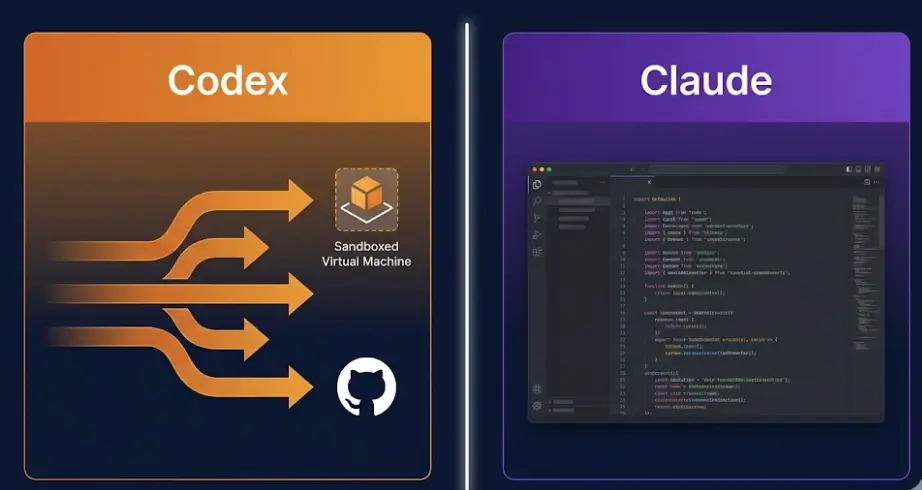
Best for autonomous background tasks, running tests, clearing GitHub issue backlogs, and parallelized work across large codebases. Strongest when you give it a well-scoped job and let it run.
Best for interactive development sessions, understanding complex existing codebases, long-form architecture decisions, and nuanced debugging where back-and-forth conversation matters.
Neither is universally better. Codex and Claude are optimized for different modes of working. Most developers building real apps in 2026 benefit from understanding both — and many use them together, each handling the part of the workflow it handles better.
In this comparison
What Codex and Claude Actually Are in 2026
Most comparisons of these tools confuse the product with the underlying model. Codex and Claude are not just different LLMs — they represent different architectural decisions about how AI should assist developers.
The name "Codex" has been used twice by OpenAI, and they're almost entirely unrelated. The original Codex (2021) was a code completion model — the engine behind early GitHub Copilot. That product was deprecated in 2023. The current Codex, launched in mid-2025, is a cloud-based coding agent built on codex-1, a variant of o3 fine-tuned specifically for software engineering. It runs in a fully sandboxed environment with a real terminal, full file system access, internet connectivity for package lookups, and the ability to run tests and execute arbitrary code. The agent can take a GitHub issue, spin up in its sandbox, work through the problem independently, write code, run tests, verify the fix, and push a commit — all without you watching. Multiple tasks can run in parallel. It's less "AI autocomplete" and more "AI junior developer you assign tickets to."
Claude in a development context is a different shape of tool. The underlying model — Claude Sonnet 4.x in 2026 — has a 200,000-token context window, which means it can hold roughly 150,000 lines of code in active memory simultaneously. Claude Code is Anthropic's CLI tool that runs Claude directly in your terminal with access to your local file system, allowing it to read, write, and run code in your actual project. The same model powers Claude within Cursor, Windsurf, and other AI-enabled IDEs. The experience is fundamentally conversational and interactive: you're building alongside Claude in real time, explaining what you want, reviewing its output, redirecting it when it goes the wrong way.
Context for this comparison: This assessment is based on practical use of both tools across multiple app development projects — a React Native mobile app, a Node.js/PostgreSQL backend, a Python data pipeline, and several n8n-based AI workflow integrations. The goal is to be useful to someone choosing between them for real project work, not to declare a winner on benchmarks.
Code Generation Quality — Head to Head
Both tools generate competent code. At the level of individual functions, components, or API endpoints, the quality is high enough from either that the difference rarely drives a decision. Where they diverge is in what happens around the code: how they handle ambiguity, whether they notice adjacent problems, and whether the output integrates cleanly with the rest of the project.
Codex: stronger on algorithmic precision, weaker on context assumptions
Codex (codex-1 / o3-based) performs exceptionally well on problems with clear specifications. Give it a precise description of a function — inputs, expected outputs, edge cases — and it produces correct, well-tested code with impressive reliability. This reflects the model's heritage in reasoning: o3 was trained extensively on math and logic problems, and that carries over into code generation quality for self-contained tasks.
The weakness shows when the task requires understanding implicit context. Ask Codex to "add pagination to this endpoint" without giving it the full project structure, and it will write technically correct pagination code that may not match the rest of the codebase's patterns, variable naming conventions, or existing utility functions. It solves the stated problem without awareness of the unstated context.
Codex wins on precision · Claude wins on contextual fitClaude: more coherent across files in interactive sessions
When a feature requires touching 8 files — updating a database model, the API endpoint, the service layer, the TypeScript types, the tests, and two places in the frontend — Claude handles this more reliably in a conversational session. It builds an internal model of the codebase from context, tracks its own changes, and maintains consistency across the cascade. The 200K context window is what makes this possible: Claude can hold all 8 files open simultaneously and reason about how a change in one affects the others.
Codex handles multi-file changes well in its autonomous mode — where it can read every relevant file before acting — but in interactive use cases without giving it the full codebase context, the quality drops. For a structured autonomous task ("refactor all API routes to use the new error handler"), Codex performs well. For an evolving, multi-turn refactoring session where requirements change mid-way, Claude's interactive model handles the course corrections better.
Claude wins for interactive multi-file workClaude: more useful for reasoning through non-obvious bugs
Pasting an error traceback into Claude and asking it to explain what's wrong returns, consistently, a diagnosis that identifies the root cause rather than just the symptom. Claude handles the ambiguous middle ground of debugging well — situations where the error message is unhelpful, the stack trace points to library internals rather than your code, or the bug is the result of a subtle interaction between two systems. Its reasoning about why something is wrong, not just what is wrong, is more reliable in these cases.
Codex approaches debugging more procedurally: it will try things, run the code, see if the error changes, and iterate. For testable bugs in sandboxed environments, this works well — it can actually execute the code and verify the fix rather than reasoning from static analysis alone. For production bugs where you can't execute the environment, or for logic errors that require understanding state across a long execution path, Claude's reasoning is the more useful tool.
Claude wins on reasoning · Codex wins on executable verificationUnderstanding Large Codebases
The gap between these tools on codebase understanding is significant — not because Codex is weak, but because Claude's context window creates a structural advantage for this specific task.
Claude Sonnet 4.x's 200K token context window translates to approximately 500–700 files of average size being readable simultaneously. For a typical small-to-medium application — 50,000 to 100,000 lines of code — Claude can hold the entire codebase in context during a development session. This means when you ask "how does authentication work in this project?", Claude doesn't just search for an auth file and summarize it — it reads the middleware, the route handlers, the database schema, the session configuration, and the tests together, and gives you an answer that reflects how all those pieces interact.
Codex in its autonomous mode handles large codebases differently: it reads files selectively as needed for the task. This is efficient but context-limited. When Codex is tasked with modifying a specific feature, it reads the directly relevant files, makes the change, runs tests, and verifies. It doesn't build a holistic mental model of the whole codebase — it solves the problem in front of it. For well-scoped tasks this is fast and effective. For tasks that require architectural awareness — "should I add this as a new service or extend the existing one, and why?" — it's less useful than Claude.
Context window comparison
| Metric | ChatGPT Codex (codex-1) | Claude Sonnet 4.x |
|---|---|---|
| Context window | ~128K tokens (effective per task) | 200K tokens |
| Codebase loading approach | Selective file reading (agent-directed) | Full context loading (Claude Code) |
| Memory across turns | Task-scoped (resets per task) | Session-persistent |
| Cross-file awareness | Task-relevant files only | Full project awareness |
| Handles 100k+ line projects | Yes, task by task | Yes, holistically |
One practical note: Claude's context advantage only materializes if you actually give it the codebase. Tools like Claude Code and Cursor handle this automatically — they read your project files and include them in context. Using Claude via a bare chat interface without feeding it the codebase removes this advantage entirely. Codex in its full autonomous mode (via the ChatGPT interface or Codex CLI) has access to the repository from the start, so its context is always correct for the task it was assigned, even if it doesn't hold the whole project in memory simultaneously.
Build Real AI-Powered Apps — With n8n, Claude & FlutterFlow
The LearnForge AI Apps course teaches you to build production-grade AI applications from scratch. No prior AI experience needed. Module 0 is completely free.
Try Free Lesson →Autonomous Task Handling
This is where Codex has a genuine, substantial advantage over Claude in its current form. The architecture is fundamentally different: Codex was designed from the ground up for autonomous, unsupervised task execution. Claude is optimized for collaborative, supervised interaction.
Codex's sandboxed VM means it can do things Claude cannot do in an interactive session: run a test suite and observe which tests fail, install a missing dependency and test whether it fixes the problem, execute a migration script and check whether the database state is correct, or make 12 independent changes to different parts of the codebase in parallel. None of these require developer involvement once the task is assigned. A developer working with Codex in this mode is a task assigner, not a collaborator — you describe what needs doing, Codex does it, you review the result.
Claude Code and Claude in agentic IDE modes can also execute code, run tests, and modify files autonomously — but with important differences. Claude Code operates on your local machine, not in a sandbox, which requires trusting it with your actual environment. Anthropic has built in safeguards (Claude asks permission before running destructive commands), but the execution model is not sandboxed in the way Codex's VM is. Claude's agentic tasks also tend to work better with developer oversight — checking in at decision points rather than running to completion silently. This is actually preferable for many workflows (you catch wrong directions early), but it means Claude is not a true "assign and forget" tool the way Codex is.
Codex's sandbox limits what it can do: Because Codex runs in an isolated cloud VM, it cannot interact with your local development environment, your actual database, your deployed services, or your team's internal tools. For tasks that require access to production systems, secrets, staging environments, or real user data, Codex's sandboxed model is a limitation rather than a feature. Claude Code, running locally, has access to whatever your developer machine has access to — which is both more powerful and requires more care.
Parallelism is Codex's most practically useful differentiator here. Running five Codex tasks simultaneously — write tests for module A, refactor the auth endpoints, update the documentation for three APIs, fix a reported bug in the checkout flow, migrate two database queries to use the new ORM — takes the same wall-clock time as running one. Claude Code handles tasks sequentially; running five separate development tasks takes five times as long. For teams looking to use AI to multiply throughput rather than just speed up individual tasks, Codex's parallel execution model is genuinely compelling.
IDE Integration and Daily Workflow Fit
Most developers spend their working time in an IDE, not switching between browser tabs to copy-paste code. How well each tool integrates into that environment affects whether it actually changes how you work or remains a novelty.
Claude's IDE presence in 2026 is strong: Cursor and Windsurf — the two leading AI-native IDEs — both offer Claude as a first-class option alongside their own models. Claude in Cursor's Composer mode handles multi-file edits with full project context, running diffs you can review and accept or reject file by file. Many developers who switched from GitHub Copilot or GPT-4-based tools to Claude in Cursor describe the shift as significant — the combination of context size and instruction-following makes Claude in Cursor noticeably better at following complex feature requests through to completion without going off-track. Claude Code as a standalone CLI is also usable from any editor, embedding in VS Code, Neovim, or other terminals with minimal setup.
Codex's IDE story is less developed. The primary interfaces are ChatGPT's Codex tab (web-based) and the Codex CLI tool. Direct integration with Cursor or VS Code exists but is not as seamlessly supported as Claude. The design intent is that you assign Codex tasks between coding sessions — while you're reviewing a PR, writing a design doc, or in a meeting — rather than actively coding alongside it. The workflow is task queue management rather than pair programming.
Integration ecosystem comparison
| Integration | Codex | Claude |
|---|---|---|
| Cursor IDE | ~ Limited | ✓ First-class option |
| Windsurf IDE | ~ Via API | ✓ Supported |
| VS Code (Copilot mode) | ~ Codex CLI | ✓ Claude Code + extensions |
| Terminal / CLI | ✓ Codex CLI | ✓ Claude Code CLI |
| GitHub integration | ✓ Native (issues, PRs) | ~ Via Claude Code |
| Direct API access for apps | ~ Limited (not self-serve) | ✓ Full API (Anthropic) |
Cost and Access in 2026
Access models for these tools are meaningfully different, and the comparison is not straightforward because Codex is primarily a product feature (bundled with ChatGPT subscriptions) while Claude is available both as a product and as a raw API.
Codex is included in ChatGPT Pro ($20/month) with usage limits, and in ChatGPT Team and Enterprise at higher limits. There's no separate Codex API with transparent per-token pricing comparable to Claude's API. For individual developers, the $20/month ChatGPT Pro plan includes Codex access — reasonable value if you're already a ChatGPT subscriber. For teams wanting predictable API-based access to integrate into their tooling, the lack of a standard API makes Codex harder to budget and build around.
Claude access is multi-tiered. Claude.ai Pro at $20/month gives personal access with daily usage limits. Claude Code as a CLI tool bills directly through the Anthropic API at per-token rates — Claude Sonnet 4.x costs approximately $3 per million input tokens and $15 per million output tokens as of mid-2026. A reasonably active development session (loading a 50,000-line codebase into context, making several edits, running a dozen conversations) uses roughly 2–5 million tokens total, putting the cost at $6–$75 per session depending on context size and how much code Claude generates. Heavy daily use of Claude Code via direct API can run $50–200/month for a developer working with large codebases.
The cost calculus for teams: For a developer already paying for ChatGPT Pro, Codex costs $0 extra. For the same developer using Claude Code via API for heavy daily development, the API cost alone could reach $100–150/month depending on usage. Claude.ai Pro at $20/month with usage limits is more affordable but constrains heavy use. For teams evaluating total cost, Codex bundled in a ChatGPT Team subscription ($30/user/month) can be more economical than per-developer API access to Claude — though the use cases and outputs are different enough that price alone shouldn't drive the decision.
Which One to Use — By Development Scenario
Building a new app from scratch — greenfield development
Claude, via Cursor or Claude Code. Building a new application is inherently iterative and conversational — you make decisions, change your mind, discover constraints, and pivot. Claude's ability to maintain the full architecture in context across a long session, follow complex evolving instructions, and reason about architectural trade-offs makes it the stronger tool for greenfield work. Codex's autonomous model is less suited to greenfield development where the task itself isn't fully defined up front.
Working through a backlog of defined tasks or issues
Codex. If you have 20 GitHub issues, 15 failing tests to fix, or a batch of well-scoped refactoring tasks, Codex handles this category better than any current alternative. Assign 5–10 tasks simultaneously, let them run in parallel while you do other work, review the diffs. The speed advantage over sequential interactive sessions is substantial. This is the workflow Codex was designed for — and it shows.
Understanding and navigating an unfamiliar codebase
Claude, with the full codebase loaded. When you're onboarding to a project, debugging a mystery bug left by a former colleague, or trying to understand how a complex system fits together before modifying it — Claude's ability to hold and reason about the entire codebase simultaneously is its clearest advantage. Ask it to explain the authentication flow, trace a request from API to database, or identify where a particular behavior is implemented, and you get answers that reflect the full picture rather than a file-by-file search.
Building AI-powered applications
Claude — for a specific reason. Applications that integrate AI APIs (OpenAI, Anthropic, Gemini), build LLM-powered features, or work with vector databases and RAG architectures benefit from Claude's depth of understanding of these systems. Claude has been used extensively to build exactly this category of application, and it reasons about prompt engineering, token management, streaming responses, and AI API error handling with noticeably more nuance than Codex. There's a degree of irony in using Claude to build apps that call Claude's own API — but it works very well in practice.
Writing tests for existing code
Codex. Writing tests is exactly the kind of well-scoped, verifiable, repetitive task that Codex excels at. Give it a module or a service and ask it to write comprehensive unit and integration tests — it will do so, run them, fix the ones that fail due to its own mistakes, and deliver a working test suite. It can do this for multiple modules in parallel. The combination of code execution capability and parallelism makes this one of Codex's highest-value use cases. Claude is also capable of writing tests, but without the ability to actually execute them within the task, you have to run them yourself and feed failures back.
Security-sensitive development with internal systems
Claude Code (local). When your development work involves credentials, internal APIs, production database access, or any data that cannot leave your infrastructure, Codex's cloud-based sandboxed model is the wrong choice — you cannot give it access to these systems, and its output is generated in OpenAI's infrastructure. Claude Code running locally operates entirely within your environment. For fintech, healthcare, legal, or enterprise development where data residency matters, Claude Code is the only viable option between these two tools.
Frequently Asked Questions
Is ChatGPT Codex better than Claude for coding?
On autonomous tasks — yes. Codex (codex-1 / o3-based) is stronger when the task is well-defined, can be verified by running tests, and benefits from parallel execution. It was built for this. Claude is stronger for interactive development sessions, understanding large existing codebases, long-form architecture reasoning, and anything where context continuity and conversational nuance matter. The best answer for most working developers is to use both — Claude for daily interactive coding, Codex for async task batches.
What is ChatGPT Codex in 2026 — is it the same as the 2021 version?
No — the Codex name was relaunched in mid-2025 for an entirely different product. The 2021 Codex was a code completion API, deprecated in 2023. The 2025/2026 Codex is a cloud-based coding agent powered by codex-1 (an o3 model variant fine-tuned for software engineering). It runs in a sandboxed environment, executes code, runs tests, reads and writes files, and can handle GitHub issues end-to-end without supervision. The two products share only the name.
Can I use both Codex and Claude together for app development?
Yes, and it's a reasonable approach. Use Claude for interactive development in your IDE — understanding the codebase, building new features, debugging in conversation. Use Codex for parallel async tasks — writing tests, processing a backlog of issues, applying consistent refactors — that run in the background while you focus on higher-level work. The tools are not competing for the same slot in most workflows.
Which AI is better for building a full-stack app from scratch?
Claude, specifically via an AI IDE like Cursor with full project context loaded. Building a full-stack app from zero involves constantly evolving requirements, cross-file consistency, and many decisions that depend on earlier decisions — all of which favor Claude's large context window, session memory, and conversational reasoning. Codex handles well-scoped subtasks within that project effectively, but the greenfield architecture and iterative building phase is where Claude's interactive model has a genuine edge.
Related Articles
How to Build AI Agents with n8n — Step by Step (No Code)
Build real AI agents with n8n's AI Agent node: memory types, connecting live tools, debugging ReAct, and a full production support agent example.
n8n Review 2026: Is It Really the Best Automation Tool?
Honest review based on real production use: AI Agents, self-hosting value, real limitations, and who n8n is the right fit for.
n8n Pricing 2026: Free vs Cloud vs Self-Hosted — What You Actually Pay
Full n8n pricing breakdown with real execution math and honest cost comparison to Zapier and Make at different usage volumes.
Build AI Apps From Scratch — Learn the Full Stack
The LearnForge AI Apps course covers n8n, FlutterFlow, and AI API integration — from zero to shipping real projects. No prior AI experience required. Module 0 is completely free.
Start Free Lesson →