Python Automation Learning Path 2026: From Zero to Job-Ready
A clear, stage-by-stage roadmap for learning Python automation — with skills checklists, free resources, and honest timelines at every step. No fluff, just the path that works.
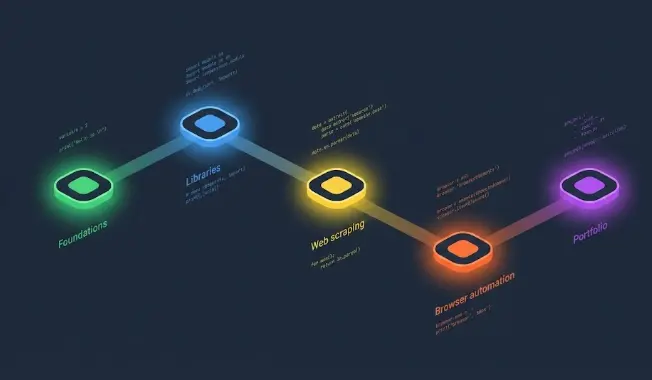
The Learning Path at a Glance
This path is designed around building real projects at every stage. Each stage has a clear skills checklist and a milestone project. Don't advance until you can build the project from memory — that's the only real test of whether you've learned the material.
👤 Who Is This Learning Path For?
This path is designed for anyone who wants to learn Python automation — whether you're starting from zero or have some technical background. Here's how to adjust it based on where you're starting:
🆕 Complete beginner — never coded before
Start at Stage 1 · 5–6 months totalFollow all 5 stages in order. Don't skip. Stage 1 will feel slow — that's normal. Stick with it for 4 full weeks before judging whether you're progressing.
📊 Tech-adjacent — Excel, SQL, or data background
Start at Stage 1 · 3–4 months totalYou'll move faster through Stage 1 because loops, conditions, and data structures will feel familiar. Spend extra time in Stage 3 (data automation) — that's where your background pays off most.
💻 Knows another language — JS, Java, Bash, Ruby
Skim Stage 1 · 2–3 months totalSpend one week on Python syntax basics, then jump to Stage 2. The programming concepts are already understood — you just need to learn the ecosystem. Focus your energy on Stage 4 and 5.
🐍 Knows basic Python — wrote a few scripts
Start at Stage 2 · 6–8 weeks totalSkip Stage 1, start at Stage 2. Your focus should be Stage 4 (Playwright, pytest) and a strong Stage 5 portfolio. Those are the gaps most "Python basics" people have when looking for automation work.
🟢 Stage 1: Python Foundations
Python Fundamentals
Weeks 1–4 · ~35 hoursStage 1 is about learning Python well enough to think in it — not mastering every feature. You need to understand variables, loops, functions, and file I/O deeply enough that they feel automatic. Don't rush this stage. Skipping it leads to confusion later when automation scripts stop working and you don't understand why.
🔵 Stage 2: Core Automation Libraries
File, Email & Web Requests
Weeks 5–8 · ~35 hoursThis is where Python starts feeling like a superpower. You'll learn the libraries that make day-to-day automation possible: moving files programmatically, sending emails automatically, and calling web APIs. Every session in Stage 2 should produce something you could actually use tomorrow. If a script doesn't solve a real problem, rewrite it until it does.
🟡 Stage 3: Web Scraping & Data Automation
Scraping, pandas & Excel
Weeks 9–12 · ~40 hoursStage 3 introduces the two skills that make Python automation genuinely marketable: web scraping and data processing. By the end of this stage you'll be able to pull structured data from any static website, clean it with pandas, and export polished Excel reports automatically. This combination alone is enough to freelance or add significant value in most office roles.
🟠 Stage 4: Browser Automation & Testing
Playwright & pytest
Weeks 13–16 · ~40 hoursStage 4 is the hardest stage and the most career-relevant. Playwright (or Selenium) lets you control a real browser programmatically — logging in, clicking buttons, filling forms, and scraping JavaScript-rendered pages that BeautifulSoup can't touch. pytest is the standard testing library that most automation engineer job descriptions specifically require. Expect more debugging here than in earlier stages; that's part of the learning.
🟣 Stage 5: Portfolio & Specialization
GitHub, CI/CD & Real Projects
Weeks 17–24 · ~50 hoursStage 5 is where most learners stop prematurely — they keep learning new things instead of building a portfolio. Stop learning new libraries. Start building complete, polished projects that demonstrate everything you know. Three solid GitHub projects with CI/CD, tests, and proper documentation will get you more interviews than completing five more courses.
🔀 Which Specialization to Choose After Stage 5
After completing the core path, you can go deep in one direction. The right choice depends on your goals:
Deepen pytest, Playwright, CI/CD, API testing with requests. Learn Page Object Model, test reporting with Allure, and mock services. High demand in Canada — entry salaries $70–90K CAD.
Deepen pandas, openpyxl, SQL integration, scheduling, and data pipelines. Add Airflow or Prefect for workflow orchestration. Strong freelance market for this — typical project $500–3K CAD.
Learn Ansible, Terraform, AWS boto3, and Python-based infrastructure scripts. Requires strong Linux and networking fundamentals. Senior roles pay $110–140K CAD in major Canadian cities.
Add LLM API calls (OpenAI, Anthropic) to your automation scripts for document processing, email triage, classification, and summarisation. Combines well with data automation. Growing demand in 2026.
🤖 Using AI to Learn Python Automation Faster
AI tools like ChatGPT and Claude can significantly accelerate your learning if used correctly. The key word is correctly — the wrong way produces the illusion of learning with none of the actual skill.
"Explain this Python error message line by line." / "Why does this loop run one extra time?" / "What's the difference between a list and a tuple in terms of when I should use each?" These force understanding, not just code.
Write the code yourself first, then ask: "Review this for bugs, inefficiencies, and Python best practices." You get the learning from writing it plus the feedback from review. This is how senior developers use AI.
"Give me 5 beginner Python automation exercises focused on file I/O. Include the expected output but not the solution." Then solve them yourself. Custom exercises tuned to your current level are more valuable than any course problem set.
Running AI-generated code you don't understand produces scripts that work until they don't, and you won't know how to fix them. Worse, you'll pass no technical interview. Every line of code you run should be code you could reproduce yourself.
The milestone projects exist specifically to prove you can build from scratch. If you generate them with AI, you skip the struggle that creates the actual skill. The projects are not the goal — the ability to build things is.
Follow This Path — With Guided Support
Our Python automation course follows this exact learning path — with structured lessons, hands-on projects, and code exercises at every stage. No guesswork about what to learn next.
Try a Free Lesson →Frequently Asked Questions
What is the best learning path for Python automation?
The best path has five stages: Python fundamentals (weeks 1–4), core automation libraries — files, email, APIs (weeks 5–8), web scraping and data processing (weeks 9–12), browser automation and testing with Playwright and pytest (weeks 13–16), and portfolio building with CI/CD (weeks 17–24). At every stage, build a milestone project before moving on.
How long does it take to learn Python automation?
Studying 1–2 hours per day: 3–4 months to reach useful practical skills; 6–12 months to be job-ready. Complete beginners take the full 6 months; people with any coding, scripting, or data analysis background usually get there in 3–4 months. Consistency matters more than total hours — daily practice beats weekend marathons every time.
What should I learn first for Python automation?
Start with Python fundamentals: variables, loops, functions, conditionals, and file I/O. Spend 3–4 weeks on these until the Stage 1 skills checklist feels comfortable. Then move to the automation-specific libraries (os, shutil, requests, smtplib). You don't need to know OOP, decorators, or async before writing real automation scripts.
Can I learn Python automation without prior coding experience?
Yes. Python is designed to be beginner-friendly, and automation is one of the most practical first applications. Expect 5–6 months to reach solid practical skills from zero. If you have experience with Excel formulas, SQL, or any scripting, you'll move roughly 30–50% faster through Stage 1 and be into real automation projects within 3–4 weeks.
Related Articles
Python Automation Skills: What Employers Actually Want
The exact skills you need to get hired in Python automation roles.
15 Python Automation Projects for Beginners
Build these at each stage to cement every skill from the roadmap.
Python Automation Engineer: Salary & Career Guide
What the job pays, what skills are required, and how to get hired.