How Long Does It Take to Learn Python Automation?
An honest, experience-based answer — with a week-by-week learning path, realistic milestones, and a clear picture of what you'll be able to build at every stage.
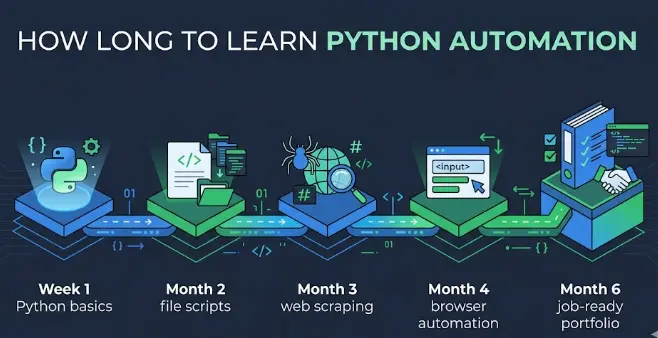
The Short Answer
These timelines assume 1–2 hours of active, hands-on practice per day. Passive watching or reading without building things significantly extends the timeline. The good news: you'll start producing real value within the first few weeks — you don't need months of study before automation becomes useful.
🚦 Your Starting Point Changes Everything
The single biggest factor in how long it takes to learn Python automation is where you're starting from. Here are four realistic profiles:
🆕 Complete beginner — no coding experience
6–12 monthsYou've never written code before. You'll need to learn what a variable is, how loops work, and how files are structured before automation makes sense. This takes longer but is completely doable — Python is the most beginner-friendly language for exactly this path.
📊 Tech-adjacent — Excel power user, analyst, or admin
3–6 monthsYou understand formulas, conditional logic, and working with structured data. You already think in terms of "if this then that" and know what a loop conceptually does. Python's syntax will feel unfamiliar, but the underlying logic won't.
💻 Knows another language — JavaScript, Java, Bash, SQL
1–3 monthsProgramming concepts are already understood. Learning Python is mainly learning the syntax and ecosystem. You can jump straight to automation-specific libraries (requests, pandas, pytest) within weeks of starting.
🐍 Knows basic Python — wrote scripts before
4–8 weeksYou know the basics but haven't used Python specifically for automation. A few weeks to learn the right libraries (shutil, requests, smtplib, selenium/playwright) and you're building real scripts. Focus shifts immediately to building projects.
📅 The Full Learning Timeline
This timeline is for the most common profile: a complete beginner studying 1–2 hours per day, 5 days a week. Adjust based on your starting point above.
Month 1 — Python Fundamentals
Variables, data types, strings, lists, dictionaries, loops, conditionals, functions, and basic file reading/writing. Focus on understanding, not memorising — look things up, that's normal. By the end of this month you should be able to write a 20-line script that reads a file, processes each line, and writes a result.
- Week 1: Variables, strings, numbers, input/output
- Week 2: Lists, dictionaries, loops
- Week 3: Functions, conditionals, error handling
- Week 4: File I/O, JSON, CSV — first real script
Month 2 — Core Automation Libraries
Now the fun begins. You'll learn the libraries that make Python automation practical: os, shutil, and pathlib for files; smtplib and email for email; requests for HTTP calls; datetime for scheduling logic. Every session should produce a script that does something you'd actually use.
- Week 5: File automation — organize, rename, backup, duplicate-finder
- Week 6: Email automation — send, attach, personalise from CSV
- Week 7: Web requests — fetch data, call APIs, save JSON
- Week 8: Combine everything — price monitor, weather email, folder watcher
Month 3 — Web Scraping & Data
Learn BeautifulSoup for parsing HTML and pandas for data processing. Add openpyxl for Excel automation. This month you'll be able to pull data from any website, clean it, and produce structured reports automatically — one of the most marketable automation skills.
- Week 9: BeautifulSoup basics — scrape a real website, extract structured data
- Week 10: pandas — read, clean, filter, aggregate CSV/Excel data
- Week 11: openpyxl — generate formatted Excel reports from live data
- Week 12: Full project — scrape → clean → report → email pipeline
Month 4 — Browser Automation & Testing
Learn Playwright or Selenium for controlling browsers programmatically, and pytest for writing automated tests. These skills are what most automation engineer job descriptions require. Browser automation is harder than file or email scripts — expect more debugging, but the capability payoff is significant.
- Week 13: Playwright basics — launch browser, navigate, click, fill forms
- Week 14: Scrape JavaScript-rendered pages, handle dynamic content
- Week 15: pytest basics — write and run tests, fixtures, assertions
- Week 16: Write a test suite for a real web app with 10+ test cases
Month 5–6 — Portfolio & Job Readiness
Stop learning new topics — start building. Pick 3–5 projects that combine everything you know, host them on GitHub, write proper READMEs, and set up CI/CD with GitHub Actions. This phase is what separates people who can pass interviews from those who can't.
- Weeks 17–19: Build portfolio project #1 — a complete automation workflow
- Weeks 20–22: Build portfolio projects #2 and #3 — different domains
- Weeks 23–24: Git, GitHub Actions, resume, and interview preparation
🗓️ Week-by-Week Learning Path (First 8 Weeks)
A more granular breakdown for the critical first two months. Each week has a clear focus, a project to build, and a library to learn.
🔨 What You Can Build at Each Stage
One of the best things about Python automation is that you start building genuinely useful things within weeks. Here's a realistic picture:
- Read and process text files
- Parse and generate CSV data
- Automate repetitive terminal tasks
- Simple calculators and converters
- Basic data validation scripts
- Auto-organise files and folders
- Bulk rename and move files
- Send automated emails
- Fetch data from public APIs
- Scheduled daily digest emails
- Web scrapers for any static site
- Automated Excel report generators
- Price monitors with email alerts
- CSV cleaning and merge pipelines
- Invoice generators from templates
- Full browser automation scripts
- Automated test suites with pytest
- End-to-end CI/CD test pipelines
- Multi-step business workflows
- Complete job-ready portfolio
⚡ How to Learn Python Automation Faster
The fastest learners don't finish courses — they build scripts. Even if you only have 30 minutes, write code that does something. Reading and watching tutorials without coding is the single biggest time-waster in this field. Close the video. Open a code editor.
When your project solves a real problem in your own life, you stay motivated through the hard parts. A script that organises your actual Downloads folder teaches you more than a tutorial example because you care whether it works.
Ask ChatGPT or Claude to explain code line-by-line, suggest a better approach, or help debug an error — but type the code yourself. Copy-pasting AI output without understanding it produces zero learning and poor interview performance.
Don't try to learn web scraping, Excel automation, and testing simultaneously. Spend a full month on each area until you can build a project from memory. Breadth without depth produces scattered, shallow skills that don't hold up in interviews.
1 hour daily beats 7 hours on Sunday. Short daily practice keeps concepts fresh, builds the habit, and prevents the "I haven't touched this in 2 weeks" amnesia that kills momentum. Even 30 minutes of active coding daily compounds quickly.
⚠️ Mistakes That Slow Down Most Learners
Finishing a 10-hour Python course feels productive but teaches little if you never wrote anything yourself. Tutorials should be references, not the main activity. The rule: for every 30 minutes of watching, spend 60 minutes coding.
You do not need to know everything about Python before writing automation scripts. OOP, decorators, metaclasses, async — none of these are needed in month 1 or 2. Start automating things in week 4–5. Advanced concepts come naturally when you need them.
If one tutorial doesn't explain something clearly, the instinct is to find a better one. This leads to starting over multiple times and never finishing anything. Pick one structured learning path and stick with it until you can build the projects in the roadmap.
Every experienced developer spends significant time debugging. A script not working on the first try is not a sign you're bad at this — it's normal. Debugging is itself a skill. Learn to read error messages carefully; most of them tell you exactly what went wrong and where.
Many learners keep adding new skills without ever consolidating them into finished projects. Without a portfolio, you have nothing to show in interviews. Dedicate the last 4–6 weeks before job searching entirely to building and polishing 3–5 projects — even if it means not learning anything new.
Start Your Learning Path Today
Our Python automation course follows exactly this learning path — from fundamentals to real projects, with hands-on exercises at every step. No fluff, no endless theory. Just practical automation skills.
Try a Free Lesson →Frequently Asked Questions
How long does it take to learn Python automation from scratch?
Most people reach useful, practical automation skills in 3–4 months studying 1–2 hours per day. You'll write your first real automation script within 4–6 weeks. A job-ready portfolio with CI/CD and test automation takes 6–12 months for complete beginners. Prior experience with any coding, scripting, or data work significantly shortens this.
What is the best learning path for Python automation?
Month 1: Python fundamentals (variables, loops, functions, file I/O). Month 2: Core automation libraries (shutil, requests, smtplib). Month 3: Web scraping and data (BeautifulSoup, pandas, openpyxl). Month 4: Browser automation and testing (Playwright, pytest). Month 5–6: Build and polish 3–5 portfolio projects with GitHub and CI/CD.
Can I learn Python automation in one month?
In one month of focused daily study (2+ hours/day), you'll learn Python basics and write simple automation scripts — file organizers, email senders, basic data processing. You won't be job-ready, but you'll have genuinely useful skills. One month is enough to confirm you enjoy it and to build momentum. Most people become confident automators after 3–4 months.
Do I need prior coding experience to learn Python automation?
No. Python is designed to be beginner-friendly. However, any prior experience — Excel formulas, Bash scripts, SQL queries, even logical thinking from accounting or data work — significantly shortens the learning curve. Complete beginners typically need 6–12 months; people with any technical background often reach the same level in 3–6 months.
Related Articles
Python Automation Engineer: Salary & Career Guide
What the job pays, what skills are needed, and how to get hired.
15 Python Automation Projects for Beginners
Build these projects during your learning path to cement every skill.
50 Python Automation Ideas for 2026
Find something worth automating at every stage of your learning path.