Best n8n Course in 2026: Free vs Paid Options Compared
Most "best n8n course" articles are written by affiliate marketers who've never opened the courses they recommend. This one isn't. We went through the actual content — what each option covers, what it skips, how long it realistically takes, and what you'll need to figure out on your own regardless of which path you pick. The short answer: the right course depends on whether you're automating your own business, building for clients, or adding automation to a developer skill set. Those three goals need different materials.
The benchmark: what you should be able to do after finishing
Any n8n course worth your time should get you to all of the following, not just some:
- Build a working webhook-triggered workflow from scratch without looking anything up
- Connect to an external API using the HTTP Request node, including auth
- Transform data between nodes using expressions and the Set node
- Use an IF node to split workflow logic into branches based on data conditions
- Connect an AI model (OpenAI or Claude) to a workflow and pass context to it
- Debug a failing workflow by reading execution logs and tracing the problem node
Use this list when evaluating any course — watch the first two lessons and see if the pace matches your level. A course that spends 30 minutes explaining what automation is before showing a single node is not the right pacing for someone who already works in tech.
In this comparison
Free Options: YouTube and the Official Docs
Free n8n learning is genuinely viable — the tool is well-documented and the YouTube ecosystem has matured significantly since 2024. The tradeoff is time: free resources are not sequential. You will spend roughly twice as long navigating between them as you would following a structured course.
n8n Official Documentation
docs.n8n.io — comprehensive reference, updated with each release
The official docs are the most accurate reference for n8n — every node, every field, every expression function is documented here. For experienced developers, this is often enough: read the quickstart, understand the data model, and figure out the rest as you build. The docs explain what each node does precisely; they do not explain how to combine nodes into workflows that solve real problems.
The Try it out section and the official workflow templates library (available in the n8n editor under Templates) are underused — there are over 900 community templates covering common use cases. Starting from a template and modifying it is faster than building from scratch when you are learning.
Works well for
- Looking up a specific node's parameters
- Understanding expression syntax
- Developers who learn by reading reference material
- Always current — updated with every n8n release
Not great for
- Sequential learning from zero
- Understanding why you'd combine nodes in a certain way
- Seeing complete real-world use cases
- Non-technical learners who need visual explanation
YouTube: Cole Medin & Leon van Zyl
Two channels cover different skill levels — start with Leon, move to Cole
Leon van Zyl (YouTube: @LeonVanZyl) focuses on workflow automation fundamentals — his beginner playlist walks through the n8n interface, core nodes, webhooks, and first real integrations in a slow enough pace that anyone can follow. The production quality is good and the examples are practical (Airtable, Gmail, Slack, Notion integrations). If you have never touched n8n before, starting here gets you building a real workflow in 4–5 hours of video + practice time.
Cole Medin (YouTube: @ColeMedin, 200K+ subscribers) covers AI agents, RAG pipelines, and advanced n8n patterns. His content assumes you already understand the basics — nodes, webhooks, expressions. Once you're past the beginner phase, Cole's videos on Claude + n8n agent patterns and vector store integrations are the best free content available on those topics. Watch Leon first, then Cole.
The n8n official YouTube channel is good for new feature announcements and short integration demos, not for sequential learning.
Works well for
- Visual learners who absorb better from video
- Seeing real workflows built from scratch
- Free with no signup required
- Cole Medin's AI agent content is genuinely advanced
Not great for
- No logical sequence — you curate your own playlist
- Can't ask questions or get help when stuck
- Videos go out of date as n8n updates its interface
- No projects with feedback or grading
n8n Community Forum
community.n8n.io — where you go when you're stuck, not to start learning
The n8n community forum is active — most specific questions about node configurations, expression syntax, and error messages get answered within 24–48 hours. It's the right place to paste an error and ask why a particular HTTP Request node is returning 401 when you're sure your API key is correct. It's not a place to start learning n8n from zero. The content is not sequential, the answers assume some baseline knowledge, and the search is mediocre for finding previously answered questions on the same topic.
Udemy n8n Courses: What's Good, What's Missing
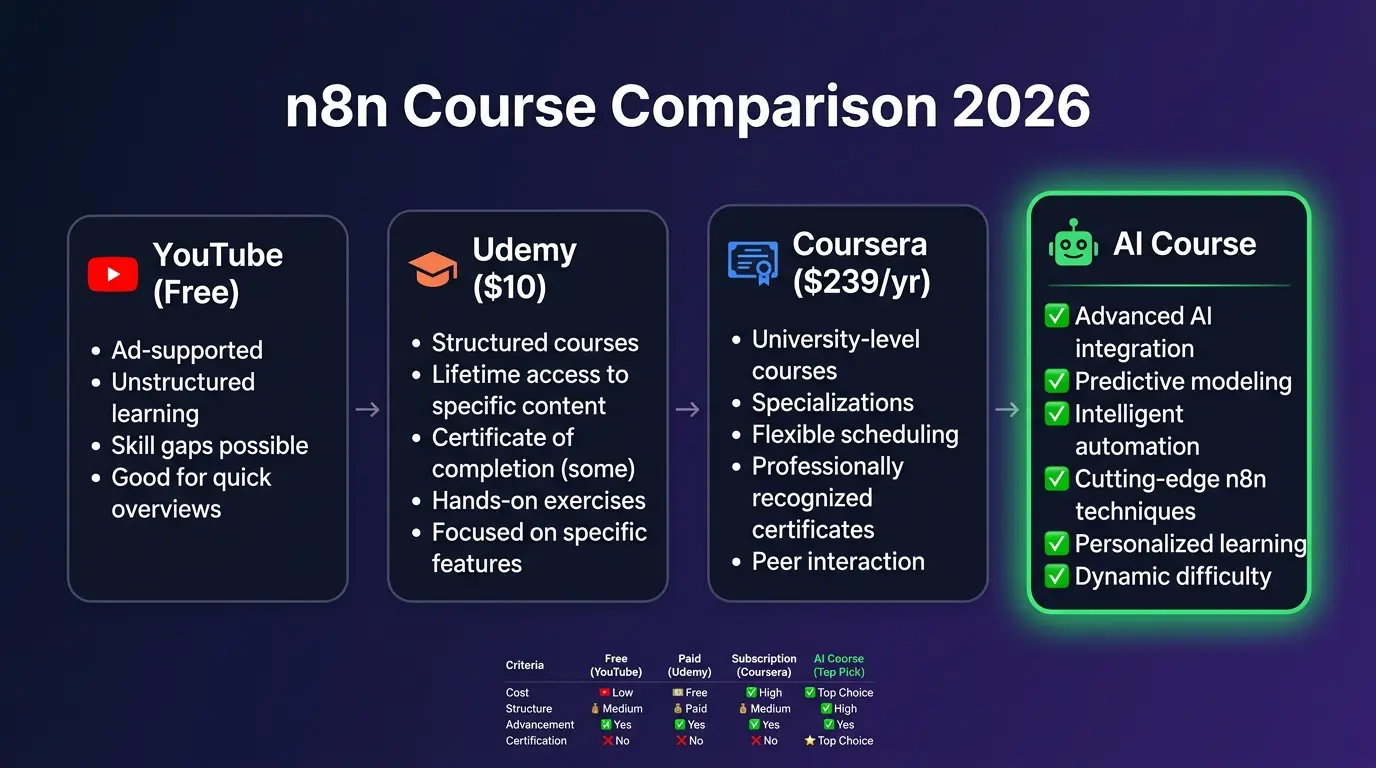
Udemy has the largest catalogue of n8n content — over 40 courses as of mid-2026, ranging from 1 hour to 12+ hours. The business model is important context: list price is $89.99–$199.99, but Udemy runs sales constantly and most courses sell for $10–15. Never pay list price. The quality variance between courses is high — here's what the top ones actually contain.
Top Udemy n8n Courses (by enrolment)
Covers fundamentals, AI agents, webhooks, HTTP Request, basic automation patterns
The highest-enrolment Udemy n8n courses (the ones with 40,000–50,000 students) cover the n8n interface, node types, webhook setup, HTTP Request with various auth methods, IF/Switch logic, and basic AI agent patterns using OpenAI. Course ratings cluster around 4.3–4.6. For the sale price, the value is real — you get a sequential curriculum you don't have to curate yourself, screen recordings that show the exact n8n interface, and lifetime access so you can revisit specific sections.
The gap becomes visible once you try to build something for production. Udemy n8n courses teach the happy path — what happens when everything works. They don't teach what happens when an API returns a 429 rate-limit error in the middle of a workflow that has already partially processed 200 records. Error Workflow nodes, retry logic, and partial-failure recovery are almost universally absent from Udemy n8n content.
Works well for
- Sequential curriculum — no curation needed
- Excellent value at $10–15 sale price
- Screen recordings show exact n8n interface
- Covers fundamentals thoroughly (nodes, webhooks, HTTP, IF logic)
- Good for personal automation projects
Not great for
- No error handling or production patterns
- No webhook security (HMAC validation)
- AI agent content is OpenAI-centric, not Claude
- No self-hosting setup or deployment
- Q&A response times from instructors vary widely
Pricing note: Never pay the list price ($89.99–$199.99) for a Udemy course. Udemy runs sitewide sales to $10–15 approximately every two weeks. If a course is not on sale today, it will be within 10–14 days. Use the "Send gift" or wishlist feature to bookmark it and wait.
Coursera: More Structure, Slower Pace
Coursera's n8n catalogue is thin compared to Udemy — a handful of courses, mostly positioned as beginner AI automation introductions rather than deep n8n training. The most notable is a "Build Intelligent Agents Using DeepSeek & N8N" course: 2 weeks at 10 hours per week (20 hours total), beginner level, included with Coursera Plus at $239/year.
Coursera n8n Courses
DeepSeek & N8N agent building — more theoretical, graded assignments
Coursera's format is more academic than Udemy — graded quizzes, peer-reviewed assignments, structured weekly pacing. That structure works well for learners who need external accountability. The DeepSeek + n8n course covers AI agent concepts alongside n8n basics, but it spends more time on AI theory than on n8n hands-on configuration. If your primary goal is to learn n8n workflows fast and deploy them, Udemy or YouTube gets you there more efficiently. If you need a recognized institution's certificate for a professional development context, Coursera is the better fit.
Works well for
- Structured weekly pacing with deadlines
- Graded projects for portfolio proof
- Professional development / employer-facing certificates
- Coursera Plus gives access to other courses too
Not great for
- More theory than hands-on n8n configuration
- Expensive per-course if not using Coursera Plus
- Slower than YouTube or Udemy for pure skill acquisition
- n8n catalogue is very limited
Structured AI App Courses (Including LearnForge)
A newer category of n8n learning focuses not on the tool in isolation but on building complete AI applications using n8n as the orchestration layer. These courses teach n8n alongside Claude API, vector stores, Postgres memory, and real deployment — because that's how production AI apps actually get built.
LearnForge AI Apps Course
n8n + Claude + real deployable projects — our own course, listed honestly
We run this course, so take this section with appropriate skepticism — but we'll try to be concrete about what's here and what's not. The AI Apps course teaches n8n as the backbone for building AI-powered automation: Claude API integration, AI Agent node configuration with real tool definitions, Postgres Chat Memory for stateful bots, HTTP Request node patterns across multiple auth types, lead generation and scoring workflows, and Notion/Slack integrations. Each module has a deployable project, not a toy demo.
What the course doesn't cover: n8n self-hosting setup, advanced database work, complex infrastructure. It's focused on building AI apps — if your goal is enterprise workflow automation at scale or self-hosted n8n on a custom server, this is not the right fit. If your goal is to build AI-powered automations using Claude and deploy them, it's directly on target.
Works well for
- Building AI-powered workflows specifically (not generic automation)
- Claude API integration — not just OpenAI
- Real deployable projects vs. toy demos
- Production patterns: error handling, confidence-gated escalation, memory
Not great for
- n8n self-hosting setup — docs are better for that
- Generic business automation without AI component
- Enterprise infrastructure or compliance-heavy environments
Which Option Fits Your Profile
The honest answer to "which n8n course is best" is that it depends entirely on your current skill level and what you're trying to do with n8n. Here's a decision table based on the four most common learner profiles:
| Your profile | Best starting path | Time to productive | What to do next |
|---|---|---|---|
| Business owner, no tech background | Leon van Zyl YouTube playlist → Udemy sale course Free first then $10–15 |
3–5 weeks to build first real automation | Build one workflow for your actual business — don't practice on toy examples |
| VA / ops manager, some tech comfort | Udemy Masterclass on sale + n8n docs for reference $10–15 |
1–2 weeks to first client-ready workflow | Focus on Webhook + HTTP Request + error handling (docs, not a course) |
| Freelancer building AI tools for clients | Udemy basics + LearnForge AI Apps course $10–15 + LearnForge |
3–4 weeks to production-quality deliverables | Build a portfolio workflow in each category: lead gen, support bot, CRM sync |
| Developer adding automation to skill set | n8n official docs + community forum Free |
1 week to productive use | Cole Medin YouTube for AI agent patterns, then LearnForge for Claude-specific integrations |
The one-sentence verdict per option
n8n docs: Best reference for developers; not a learning curriculum for everyone else.
YouTube (Leon van Zyl): Best free starting point for beginners; stops being useful once you need AI agents or production patterns.
YouTube (Cole Medin): Best free content for advanced AI agent patterns; requires you to already know n8n basics.
Udemy: Best value for a sequential beginner curriculum; buy at sale price, never list.
Coursera: Best if you need a structured certificate for a professional audience; not the most efficient path to n8n fluency.
LearnForge AI Apps: Best if your goal is specifically building AI-powered automations with Claude; too narrow if you want generic workflow automation or self-hosting.
Building AI Apps with n8n and Claude?
The LearnForge AI Apps course covers n8n AI Agent node, Claude API integration, Postgres memory, real tool definitions, and deployable projects — not toy demos. Try the first lesson free.
Try the First Lesson Free →3 Things No n8n Course Teaches (But You'll Need in Production)
Regardless of which course you pick, there are three areas that virtually no n8n course covers — because they require production experience to know they matter. You'll encounter all three within the first few weeks of running real workflows.
Gap 1 — Error Handling and Retry Logic
Every n8n course shows workflows running successfully. In production, APIs return 429 rate-limit errors, webhooks deliver duplicate payloads, and third-party services go down for 20 minutes at 2am. Most beginners set their workflow to "On Error: Stop Workflow" and discover the problem hours later when a customer complains. n8n's Error Workflow node lets you define a separate workflow that runs on failure — it can send a Slack alert, log the failed item to a spreadsheet, or attempt a retry. The HTTP Request node has a built-in Retry on Fail option (configurable to 3 retries with exponential backoff) that prevents transient network errors from failing entire runs. Zero courses cover this systematically.
Gap 2 — Webhook Security (HMAC Validation)
n8n's Webhook Trigger node accepts any POST request to its URL by default — no authentication, no validation. That URL is semi-public: it's stored in your workflow, passed to third-party services, and anyone who finds it can send arbitrary data to your workflow. Payment providers (Stripe, Paddle) solve this with HMAC signatures: they hash the request body with a shared secret and include the hash in a header (Stripe-Signature, X-Hub-Signature). If you don't validate the signature in a Code node before processing the payload, a malicious actor can send fake payment confirmations and your workflow will process them as real. No n8n course covers signature validation.
crypto.createHmac('sha256', secret).update(rawBody).digest('hex') and compare to the header value. Reject (return early) if they don't match.
Gap 3 — Multi-Environment Credential Management
n8n doesn't have built-in dev/staging/prod environment separation. When you're building a workflow locally and then deploying it to production, all your API credentials (Slack, Notion, Stripe test vs. live keys) are stored in the credential manager. Without a naming convention and a deployment process, you will eventually run a development workflow against production credentials — posting to a real Slack channel, charging real customers, or deleting real CRM records. Every team that runs n8n in production eventually develops a convention for this; no course teaches it because it requires having a production system to manage.
[DEV] Stripe, [PROD] Stripe. Enable workflow-level tagging to separate dev and prod workflows. Before deploying any workflow, do a credential audit: open each node and verify it uses the [PROD] credential, not [DEV].
FAQ
What is the best free n8n course for beginners? +
The best free starting point is Leon van Zyl's YouTube playlist for absolute beginners — it covers the interface, basic nodes, and first real workflow in around 4 hours of video plus practice time. Cole Medin's channel is the right next step once you have the basics and want to build AI agents. For debugging specific problems, the n8n community forum is where you get answers in 24–48 hours. The gap with free resources is structure: you can learn n8n for free, but you'll spend 2–3x more time navigating content than following a sequential curriculum.
How long does it take to learn n8n? +
To build your first working automation: 4–8 hours with structured materials. To feel comfortable building any workflow from scratch without looking things up: 20–30 hours of practice. To be client-ready (debugging, error handling, production deployment): 40–60 hours including real project work. YouTube alone stretches these timelines by 50–100% because content is not sequenced and you lose time finding the right video for each step. A structured course cuts the path to productive use from 3–5 weeks to 1–2 weeks.
Is the n8n Udemy course worth it? +
At the sale price of $10–15, yes — for learning the fundamentals. The top Udemy n8n courses cover the interface, basic nodes, webhooks, HTTP Request, and simple AI agent setups well. What they miss: error handling, production deployment patterns, HMAC webhook security, and multi-environment credential management. If you need n8n for client work or production automation, you'll outgrow a Udemy course within a few weeks and need to piece together production knowledge from the community forum and docs separately.
Does n8n have an official certification? +
No. As of August 2026, n8n does not offer an official certification program. Third-party platforms like Udemy and Coursera issue completion certificates for their own courses, but these carry no official weight from n8n. For client-facing or freelance work, a portfolio of working workflows you've shipped is far more valuable. If you are pursuing n8n professionally, document what you built, what problem it solved, and what the measurable results were — that is what potential clients and employers actually evaluate.
What should I learn after finishing an n8n course? +
Three areas most n8n courses skip entirely: (1) Error handling — the Error Workflow node, retry logic on HTTP Request nodes (3 retries with exponential backoff), and Slack alerts when production workflows fail. (2) Webhook security — HMAC signature validation in a Code node before processing any incoming payload, especially from payment providers. (3) Multi-environment credentials — a naming convention and deployment checklist to prevent dev workflows running against production APIs. All three are covered in the n8n official docs and community forum; none are in standard Udemy or YouTube content.
Can I learn n8n without coding experience? +
Yes, for the majority of use cases. n8n's visual workflow builder handles most automation logic without code — connecting nodes, mapping fields, setting conditions, triggering actions. You hit the code requirement when you need custom data transformation (the Code node runs JavaScript) or when an API returns an unusual response format. At that point, basic JavaScript helps — but you don't need to write it from scratch. In practice, most non-developers learn to read and modify existing Code node snippets rather than authoring JavaScript from zero, which adds about 4–6 hours of extra learning time upfront.
Ready to Build Real AI Apps with n8n?
The LearnForge AI Apps course teaches n8n + Claude API + real projects you can deploy — not sandbox demos. Every module ends with a working automation you keep. Try the first lesson at no cost.
Start the AI Apps Course →